NetWorx version 7
35 posts · Closed
NetWorx version 7 is now available for download. As usual, we appreciate your feedback. :-)
This is a complete rewrite of the product aiming at future extensibility and multi-platform support. The following has changed from version 6:
- Added: extensive macOS support.
- Added: colour schemes and dark mode support.
- Improved: uptime & downtime monitor.
- Improved: multiple graph support.
- Improved: graph shows active apps and chart.
- Improved: simplified and refreshed user interface.
- Removed: dial-up features, hourly report, traceroute, ping and most hidden settings.
Upon installation, your usage records will be transferred over. Application settings will not be transferred and you will need to configure the application anew.
If for any reason version 7 does not suit you, you can download and install version 6.2.10 again: NetWorx 6.2.10 (installer), NetWorx 6.2.10 (portable)
I tried 7.0 this morning. I encountered a few issues I was wondering if there is a solution to:
- No corner grapples to resize when the title bar is hidden
- How to remove the + - and star icons?
- Set graph to click-thru mode option?
- Flickers out a lot near the edge of the screen trying to snap/unsnap very rapidly? Makes positioning tricky
- No longer seems to snap to a left-positioned taskbar
- A lot of hidden options removed like snmp version?
Gone back to 6.2.10 for now but looking good otherwise. Thanks
Thanks for the feedback. We have just fixed graph snapping and made captionless graph resizeable. The updated build can be downloaded from the NetWorx product page.
At the moment the buttons on the graph can't be hidden, but we'll add this later. Perhaps click-through as well, depending on how many users want it.
Regarding SNMP, the app will try SNMPv2 and then fall back to SNMPv1. We'll add SNMPv3 if there is demand for it, but it's more like an enterprise thing I guess.
Was the graph transparency feature discontinued in version 7? I have used this feature in the past, are there any plans to bring this feature back?
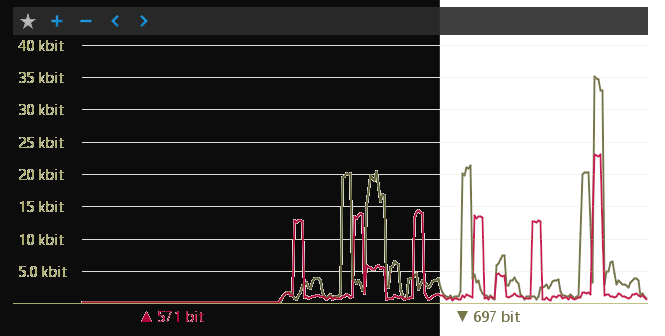
The graph transparency is unfortunately incompatible with the anti-aliased drawing that is used in v7. As the graph lines and text are now drawn with antialiasing and blended with white background by default, it all looks good when the window behind is white, but otherwise it does not:
Good Morning,
I've just upgraded to version 7, and while I like the update, but I'm no longer able to see the current transfer rate when I hover the mouse over the tray icon like I could in version 6. Is there a setting to enable this somewhere or has this feature been removed?
Thanks,
Scott
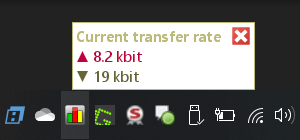
The display of the transfer rate on mouse hover had to be removed because it did not work well with some versions of Windows.
However, you can assign the transfer rate display to the left mouse click, with the subsequent left click closing the pop-up:
I love NetWorx. Glad I have encouraged others to use it.
Just updated after notice. And have reset a few graph settings.
But, there is an outline (white) around the graph in my taskbar. In the previous version, I was able to change that color, I recall. I cannot find a setting for changing the outline color or removing the outline. Is there one I am missing?
Sorry to trouble you with this question, but I rely on NetWorx and look at my tray graph constantly. The outline is just a very small, bothersome (to me) issue.
That's a good point! We have just removed the outline, and the graph should look a lot better on Windows 10/11.
Please download a fresh copy from NetWorx page and install it over. Then reboot and the annoying border should be gone. After that, you can select the graph background colour that matches your taskbar, and the graph area will appear seamlessly integrated.
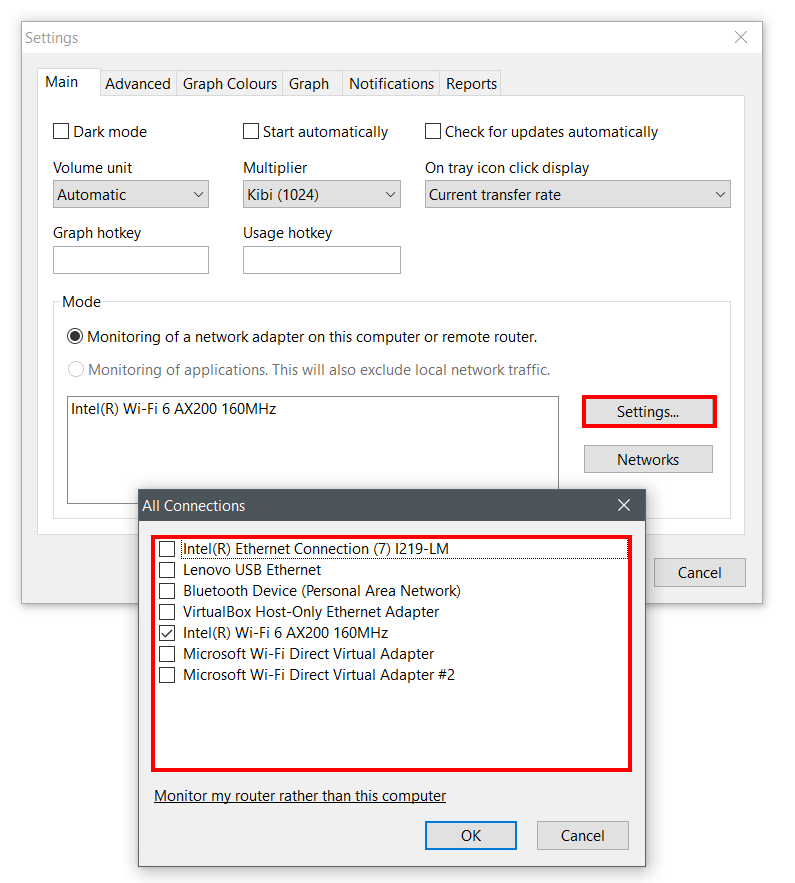
I installed Networx 7 a few days ago. Made a few changes including On tray icon click display changed to Usage graph. Was working OK for awhile. Then, the graph stopped showing. Realized my license was not used (still running trial version). Pasted license in. Still no graph. Clicking the system tray Networx icon does nothing (no graph). The right-click menu on the system tray icon has Show Graph disabled. I tried re-installing 7 again and re-started. Still no graph. Also, version 6 had an option to show summary totals in the graph. Have not found a way to show that in version 7. Are there any steps to restore graph functionality? Have not gone to version 6 yet. Thanks.
This suggests that the ID of your network adapter may have changed. Kindly try clicking the Settings button and choosing a network adapter to monitor:
First crash. Error message:
Abort due to constraint violation: NOT NULL constraint
failed: PROCESS_USAGE.PROCESS_ID
I will also miss the per hour Datalog as when dealing with limited data it helps to understand how much is used in an hour. Usage per day is not as helpful.
Networx 7 just stops working without notification. Uninstalled it.
In version 6 I could choose igb0 in WAN interface, in version 7 I cannot. And it then fails to use SNMP. I'm also getting a port issue in a separate application that wasn't there before installing version 7, and the issue disappeared after reinstalling version 6.
Thanks, that was the fix. For some reason, after changing settings, I had no adapter selected. Graph is available now.
@nicolaj: Please provide more details as to what seems to be wrong with SNMP. No igb0 interface is listed? Or it can't be selected? Or no activity reported? Or something else?
Likewise with the port issue, we need as much details as possible to be able to reproduce and fix it. That is, what exactly was the issue and what application was affected.
I just upgraded to NetWorx 7.0 on Windows 10. I'm trying to set up e-mail reports and when I click the Test button on the E-mail Settings dialog I receive a message box saying "E-mail sending failed. File not open". This was working under version 6.
Help?
Thank you.
Rob
Apologies. It was a bug that crept into the release. Thank you for reporting it.
Please download the fixed build and install it over your current installation. Email reports should now work as expected and you no longer need to supply SNMP settings.
Thank you; that solved my problem. :-)
Same issue here with "Abort due to constraint violation: NOT NULL constraint failed: PROCESS_USAGE.PROCESS_ID".
Cannot figure out why or where this error message is triggered.
The NOT NULL constraint issue hasn't been so far reproducible in our tests. But we hope we have figured out what might be causing it.
Please download the latest build and install it over your current installation. The error should no longer occur.
Let us know how this works for you.
Hi,
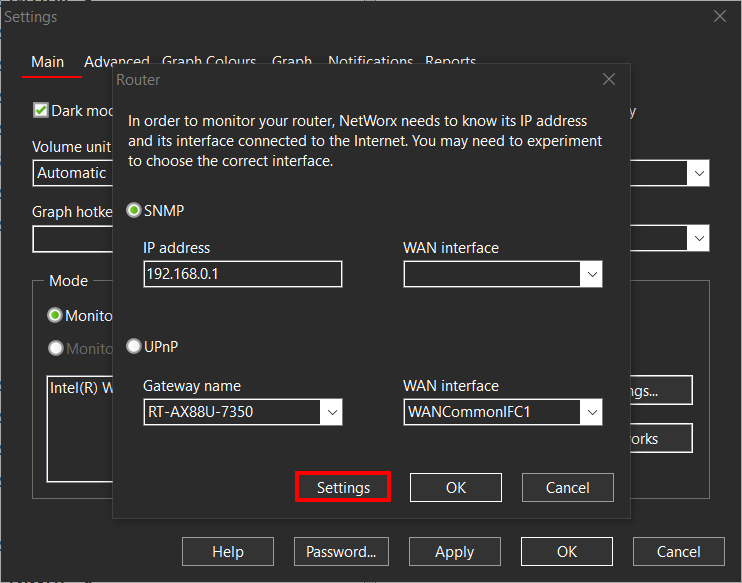
Asus router was monitored via SNMP with no issues with the previous version. I have ensured that the right interface is selected as SNMP monitoring is working with no issues on my Mac. "Show graph" displays no traffic whatsoever. Any assistance would be appreciated, thanks.
With ASUS, it is probably related to the fact that NetWorx v7 defaults to SNMPv2, which uses bulk requests that may not work well with some devices. We'll check this out and publish an update soon where you will be able to choose a specific SNMP version.
Many thanks.
We have updated the SNMP implementation and it should now work with any device that supports it. It is also possible to choose a specific version of the protocol, so you can choose 1 or 2 to see which works.
The latest builds can be downloaded here.
Hi,
The latest build now has me up and running again, thank you. I'm not sure if I've missed something new with v7.0 or in the settings, the scaling displayed doesn't go down into KB/s regardless of what's selected in the settings. Essentially, I'm trying to recreate the same functionality as the previous version.
For that there is a separate setting that is in the hidden settings. Simply press Ctrl + O (letter) in the Settings window and change Display Format to any of the following:
- 0 for automatic
- 1 for kilobits/kilobytes
- 2 for megabits/megabytes
- 3 for gigabit/gigabytes
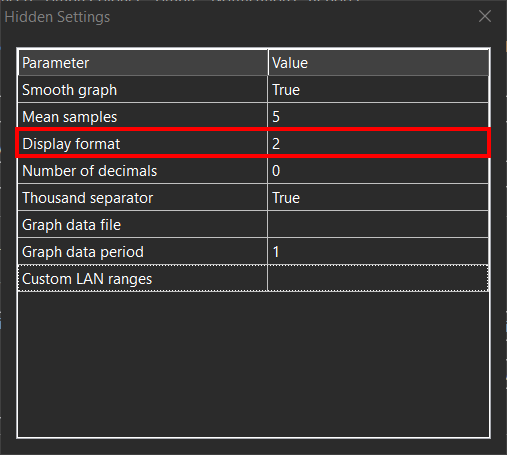
Update: in version 7.1.1 this became the Speed setting on the Main tab in the ordinary Settings.
That sorted it, thanks again.
I just upgraded to v7.0.1 and the "Show Graph" option is missing when you right click on the tray icon. I re-installed it, rebooted my Win10 PC, but still no "Show Graph" option. What happened to it?
As many users requested, the Show Graph menu was removed, and now the graph can be open by clicking an adapter name directly in the popup menu:
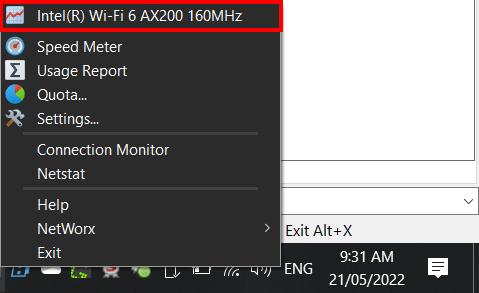
If this item is not present, please check the list of monitored adapters:
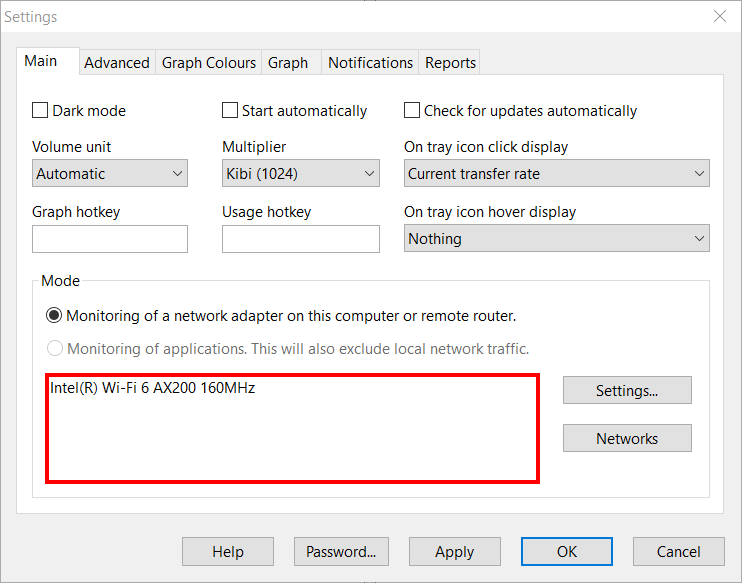
Thanks !
If I have purchased the 6x version, it will work full 7x or do I need to re-purchase? Because I do not know whether to install the update?
The inclusion of updates goes by time, not by the major version numbers. Please check your update period in the About dialog in your current version 6. If it has not expired, you are can update without re-purchasing to any version 7.x released within your update period:
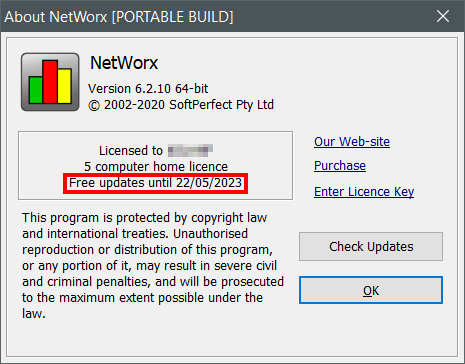
I'm unsure what it's called, but in v6 the graph would fade when I moused over it. Having the graph there all the time is inconvenient as I have to keep moving it to see things behind. Is this still operational and how do I set it up in v7?
The fade feature is not available in version 7 due to cross-platform limitations. If you absolutely need the graph to fade away when mouse is over it, you will need to downgrade to version 6.
However, if you don't require the fading per se, but rather wish to be able to quickly show and hide the graph, there is a simple solution in v7: set up a global hotkey to show/hide the graph any time you want.