Toolbar displays wrong speeds and goes blank after upgrade
2 posts · Closed
After the upgrade, the toolbar (taskbar extension) displays the wrong speeds and no setting changes seem to make a difference. Went back to the last version, but the toolbar stayed on the 7 version and now does not display any info. Just a blank toolbar with the up/down arrow.
It looks like version 6 installer will not replace the taskbar extension from version 7 due to its lower version number. There are two options/solutions:
1. With version 7
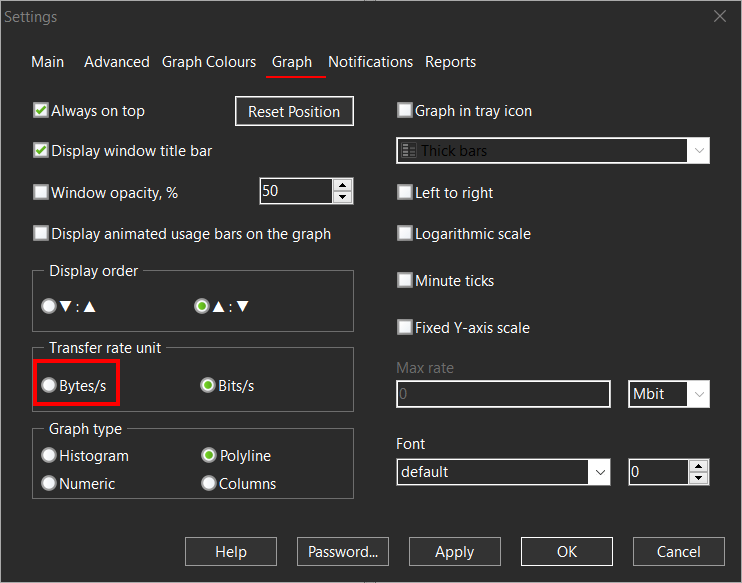
You can install version 7 over version 6 again. It was likely that the speeds seemed wrong to you simply because the new version defaults to megabit/s while earlier versions defaulted to megabytes/s. The difference would be eight times. If you install version 7, you can set it up to display megabytes under Settings - Graph just like version 6 did:
2. With version 6
If you want to stay on version 6, the following workaround will bring back the old taskbar extension:
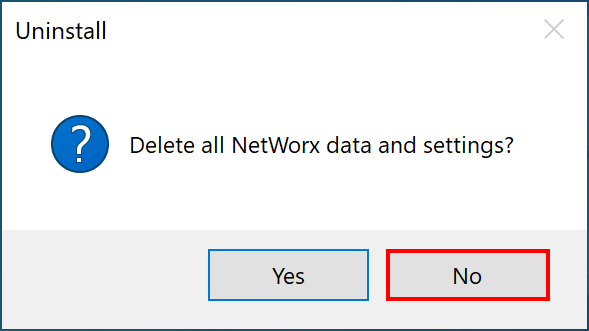
Uninstall the currently installed version 7 and reboot. Most importantly, choose [NO] when the uninstaller asks if you want to delete the data and settings.
Install version 6 again after the restart. It should then pick up your settings and data and continue functioning normally.