Show only selected adapter in Show Graph menu
3 posts · Closed
Hello,
I recently updated to NetWorx v7.0 and have the following feature request:
If only one network adapter is selected via Settings > Main, when the user selects Show Graph in the NetWorx menu show only that adapter.
Currently the user has to cascade the menu to select the (only) network adapter, which adds an unnecessary click to the operation. Prior to version 7.0, this was the functionality for Show Graph.
Also, it would be nice to have the ability to rename the network adapters, as the default names are often ugly and long, but I understand that probably requires a substantial code change.
Thanks,
Troy
Thank you for your feedback, those are good points!
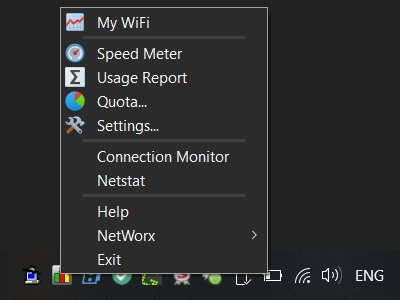
We have just updated the app so that it displays the graph menu out of the submenu.
By the way, you can also set a global hotkey in Settings - Main for quicker access to show/hide the graph.
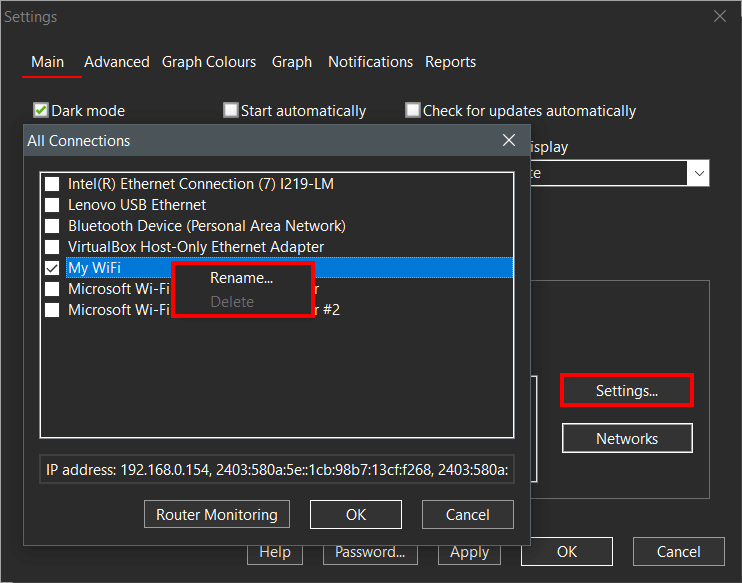
We have also added a new Rename right-click menu option that can be used to rename any adapter in the list, which is accessible by going to Settings, then Main tab, then pressing the Settings... button, as shown below.
To try the new changes, please download the latest build and install it over your current installation.
Thank you for the prompt response!
I tested the latest release and found the changes to the "Show Graph" functionality to be most excellent.
I appreciate your action on my feature request - thanks again.