Reset window resets usage to 0 instead of custom values
4 posts · Closed
Hi,
I upgraded to the latest version several weeks ago. (Seems quite good.)
Since I am on satellite internet, I try to keep a close eye on my usage. Every month when my new data month starts, I back up the old data and then reset all my data since the start of the day. So like today when I did the backup, 5/24/22 had received 276 MB and sent 17 MB. So I put those numbers into the Reset window so that the month would start with the correct data.
Instead, it reset everything to 0. I think the reset is not working correctly.
Thanks!
David
Thanks for reporting this issue. We have just re-tested it, and it worked fine when a network adapter was monitored, but not when NetWorx was monitoring apps. That's likely to be your case and it was a bug indeed. It happened because we needed to create a "dummy" app record in the database. Now a reset operation will create a dummy record as if the reset numbers were downloaded/uploaded by NetWorx. Please download the latest build and install it over your current installation. The reset command should now work correctly.
By the way, it's probably not necessary to reset it each month. Instead, you can align NetWorx reporting with your ISP billing period by using the Month starts on setting on Advanced tab in Settings. This way, one month in NetWorx would match one month of your ISP.
My apologies for the very late reply. Things have just been too hectic around here.
Thank you even more for the very prompt and effective email. I haven't had a chance to download the fix yet, but I have
implemented the change that you recommended about the month start date. Which you are correct, is what I was trying to emulate with the resets. But your way is much better. No more forgetting resets, Yea!!!
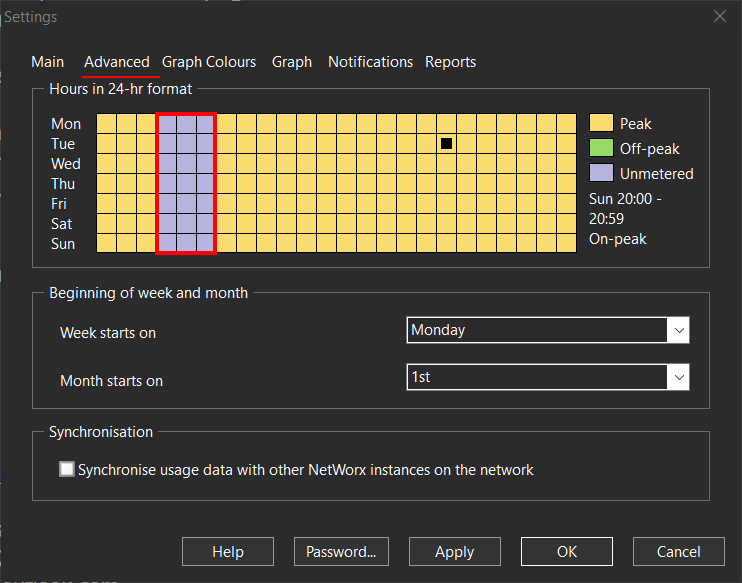
My ISP (Viasat) gives me a free time from 3 am to 6 am that doesn't count to my data cap or speed limit. Is there any way to not count those times? Just curious, not sure that I should not monitor that time anyway.
Thanks again and if you don't want to answer the last question, that is fine.
Cheers!
David
That can be easily done. You can mark the 3am to 6am hours either as 'unmetered' or 'off-peak', depending on your personal preferences.
The 'unmetered' times are not shown in reports (but are still recorded), while the 'off-peak' periods are recorded and shown separately from peak times. You can change this setting at any time, and it will update your reports accordingly.