Speed graph in taskbar overlays other icons
8 posts · Closed
After updating to Windows 11 20h2 20.09.22, the speed graph in the taskbar has moved to the left and now partially overlays other icons.
It looks like Microsoft have modified taskbar layout in their recent update.
Please download the latest build and install it over your current installation. The taskbar graph should now be positioned correctly.
I can confirm new build fixed the problem on my Windows 11 21H2 (tu) ;-)
Unfortunately 7.1.0 with Win10 22H2 does the same and appears on the far left of the taskbar stopping any pinned icons from appearing.
Rolling back to 7.0.3 returned it to the right of the taskbar.
Wow. 23 versions of the networx setup file on my local machine... cleaned them up after downloading the latest on Win 10 22H2. Found that the program is completely broken with the Windows taskbar integration. Great, I'll download the previous version and roll back... Nope! No previous versions to be had.
You really need to make previous versions available to roll back to, so we don't have to go downloading them from shady mirror websites, especially considering the challenges your team is continuing to face with Microsoft changing up the taskbar and breaking things in updates.
/rant
It is a pity that Microsoft keeps wrecking and breaking things for all of us. I've been using Networx for as long as it existed, and I totally got attached to its taskbar graph. I'll keep an eye for any news here. Hopefully you will be able to fix it again. Thank you for trying anyway!
@Jedis
I too had to roll back to an older version for which I kept an installer. That's what the developers tell everyone to do: take care of yourself and keep a copy of whatever you want to keep using or might want to go back to.
Microsoft's making mess of the taskbar repeatedly isn't news anymore. Therefore one should always think of a rollback option before updating.
Most other applications don't offer any solution. These guys are at least trying. And they could really do without complaints from the facebook generation who are used to all decisions being made for them and everything being always available at their whim. Sorry if this sounds personal, but I do believe in taking developers' advice seriously and making one's own safety net instead of expecting someone else to provide everything. You don't need to keep 23 versions. You only need one spare that worked for you.
/rant^2
In Windows 11 Microsoft have completely removed any taskbar customisations. There is no official or right way of implementing it any more. So third party apps have to either resort to workarounds or simply abandon the idea of presenting themselves within the taskbar.
Now, while our workaround tries to handle everything correctly, there may be times when it doesn't work well. For example, when certain taskbar elements are not there, or not in the expected location, or when the user has uncommonly large number of icons in the taskbar or configured it in some peculiar way. In a fairly standard setup it works as it should:
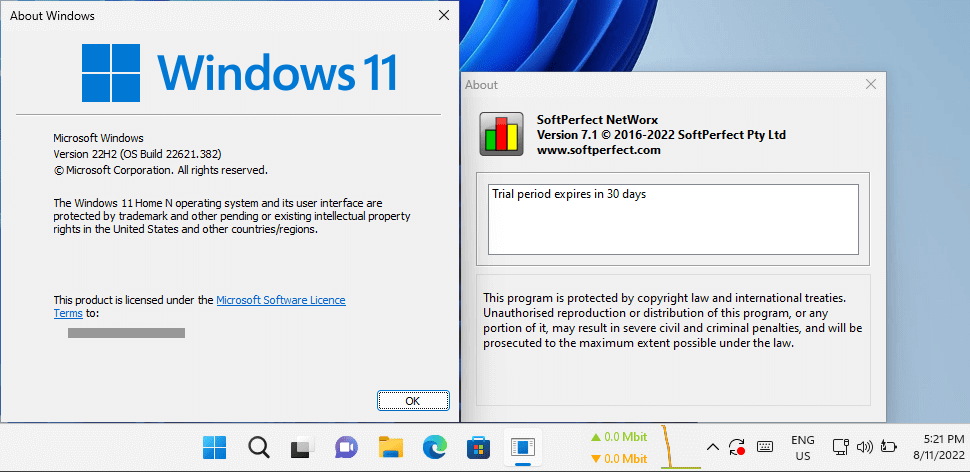
Our goal is to make it work everywhere. So if the taskbar extension does not work for someone, please post a screen shot here, so we could figure it out or request further specific information. Attached to this message is a small tool that will print out the hierarchy of your taskbar elements. If you could post here or send us its output together with your screen shot, that would help a lot.
Big thanks to the users who sent us additional reports!
We have just updated the taskbar graph implementation. Everyone who is experiencing any erratic behaviour is welcome to try the latest build.