NetWorx toolbar disappears after locking Windows 10
13 posts · Closed
After the most recent update, I've noticed that every time I lock Windows 10 and re-login, the NetWorx toolbar is no longer visible in my taskbar. I have to "recheck" the toolbar in the toolbar list and start (restart?) the NetWorx program, and then it's visible until I lock the desktop again. I also use DisplayFusion and AquaSnap, which may or may not interfere with NetWorx.
It doesn't seem to be reproducible with DisplayFusion and AquaSnap with the default settings.

Perhaps you have Desktop Locked or Desktop Unlocked triggers defined in DisplayFusion?
I don't use any of those triggers in DF. I do have "enable multi-monitor taskbar" enabled.
Usually when I lock the desktop it's locked for 8+ hours, but I just tried locking and unlocking after a few seconds and the problem is no longer there. If I lock the desktop and then login hours later it looks like NetWorx is no longer running. The toolbar is unchecked and after re-checking it the toolbar GUI is muted colors with just the word "networx" and some dotted lines. It appears this is the default GUI when the NetWorx program isn't running. After executing the NetWorx app the toolbar comes back to life.
I don't know if there's a debug log I can generate or what else to try, maybe the program is crashing or something is forcing it to close?
It looks like you are using an older version. In the latest release the taskbar graph is implemented without a toolbar. This was done to support the taskbar graph on Windows 11, where Microsoft removed it.
I recommend downloading and installing the latest version from NetWorx product page. If it solves the problem, great. If not, let us know and we will look into it further.
I've been using version 7.0.3, which appears to be the latest release.
I found some references online to Windows closing apps when locking for a long time. This could be because the computer goes into sleep or restarts. Having said that, I have once again tried installing DisplayFusion and AquaSnap and enabling multi-monitor taskbar, but everything worked as expected. Putting the computer to sleep and waking up worked as expected as well.
Perhaps you could try uninstalling NetWorx (this will remove any toolbars if installed with earlier versions), rebooting and then installing the latest build from here? We have fixed a few things there, so chances are the issue may be gone.
I uninstalled it and then downloaded the latest from your link and it did get rid of the toolbar listing, but the problem persists. I'm looking at the task manager and the network program is not running. I suppose I can make an AutoHotKey script to run the Networx program after unlocking windows, but definitely not ideal.
In this case we need to find out what causes the process termination, i.e. whether networx.exe exits by itself or the OS or another process terminates it.
There is a tool from Microsoft called GFLAGS that allows one to set up silent termination monitoring. You can download it or use the one attached to this message and set it up as shown below. Ensure that C:\NetWorx destination exists as dumps will be written there.
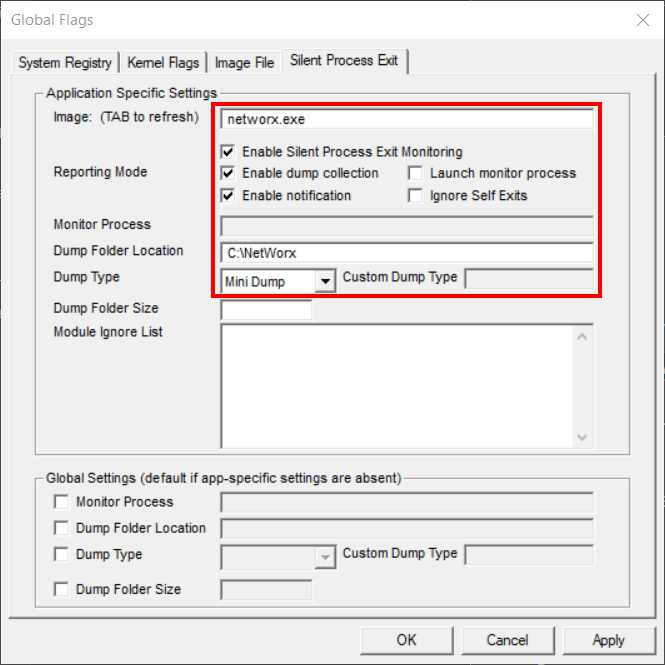
After that, lock your PC and wait until the networx.exe process is gone.
Once that happens, there will be an event recorded in Windows event log under Windows Logs - Application, plus a dump file will be created in C:\NetWorx.
Please post the log data here.
I've installed gflags and have it setup, but now networx.exe has stopped "crashing" it seems. I've logged in twice now after 8+ hrs and the program is still running. I'll let gflags run for a few more days and then disable it and see if anything changes.
Another question I have, after installing this new toolbar-less version, it seems to be putting itself on top of my weather toolbar (see attachment). I tried moving it to the left, but it just stretches. Any way to fix that?

Thanks for pointing this out.
We have just updated the app, so it will take the weather toolbar into account:

Please download the new build here and update your current installation.
It finally crashed/was forced closed, happened about 4 hours after I locked windows according to the timestamp. I'm not able to attach the zip file as it is larger than max file size limits.
You can send us the dump here.
Please include the message(s) from Windows event log from Event Viewer - Windows Logs - Application.
Thank very much you for providing the logs and additional information, and assisting us in finding the cause of the problem. It turned out to be that once the PC is locked, Windows may terminate and restart Explorer, thus causing the disappearance or duplication of the taskbar graph upon unlocking.
The issue has now been fixed in the new build and will be included in the next release.