Data usage appears doubled when using a VPN
6 posts · Closed
Hi NetWorx Team,
First of all, very cool program.
I got NetWorx because I moved somewhere without hardwired internet. So I got a mobile hotspot with limited data per month. And I should note that it is just me with one macOS desktop that is being monitored. Right away I noticed that when I downloaded something of a certain size, it showed the amount of data of the downloaded item both for my browser (Firefox) and my VPN. I kind of freaked out. Luckily for me, my carrier didn't record the usage doubled. So, it turns out that with my VPN the totals are all close to double of my actual usage.
Yes, because it was pretty consistent I could just do the math and have an idea of my actual usage. But still, it put me off a bit.
I have since found a free, very basic program for Mac on the App Store, Bandwidth+, that also reads a bit high, but is very close to the actual usage. But I miss the graph and the application breakdown of your great program.
So, if you have a solution to the inaccuracy issue or fix it, please let me know.
Thanks and keep up the good work,
Roger
Thank you for your feedback.
It is a common issue with VPN clients, because they intercept network connections from other apps, encrypt them, and then send them on within a secure tunnel. This is usually seen as network activity is correctly reported for other applications, and then the same activity is reported again for the VPN app.
The reason Bandwidth+ does not suffer from this problem is that it merely monitors a network adapter, i.e. how many bytes were sent and received. It does not analyse network activity by application. There is a monitoring mode in NetWorx that works likewise.
We think the best solution here would to add a way to "ignore" an app. So you would be able to mark the VPN app as "ignored" and its network activity will be disregarded. This will ensure the readings are correct.
We will add this feature shortly and post a link to the update.
That was an above and beyond the call of duty response. Thanks. And yes, please let me know when you do that. And glad I could spur you on to improve your already great product.
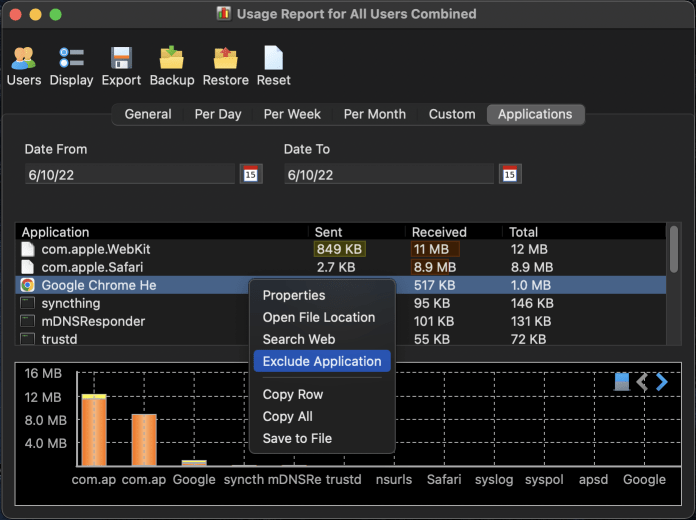
We have added a new menu item in the apps view that lets you exclude any app. When an app is excluded it will still be shown in the list, but its upload/download figures will be excluded from all reports. The new builds can be downloaded here.
Hello,
Would it be possible to prevent the excluded app from affecting the graph too?
Thank you for pointing this out. The latest build hides excluded apps from the real-time graph and the real-time app view.