Taskbar icons disappear while NetWorx is running
3 posts · Closed
I am using NetWorx 7.1.2 on Windows 10 21H2 64bit, remote desktop. I am also using Stardock Start11.
The problem is that the taskbar icon disappears while NetWorx is running. Only the Start button is at the taskbar, and there are no pinned application icons or running application icons. Is there any way to resolve this?
The problem may be due to the combination of NetWorx and Start11.
It looks like Start11 is not compatible with NetWorx taskbar graph. Once we installed Start 11 and ran it alongside NetWorx, it led to odd animations and a constant taskbar resize loop. This is likely because both apps directly manipulate the taskbar and its elements, due to Microsoft's crippling taskbar functionality in the latest versions of Windows.
However unticking Display Speed in Taskbar option seems to make everything work fine. So if you have any issues with NetWorx and Start 11, please try disabling this feature in NetWorx menu:
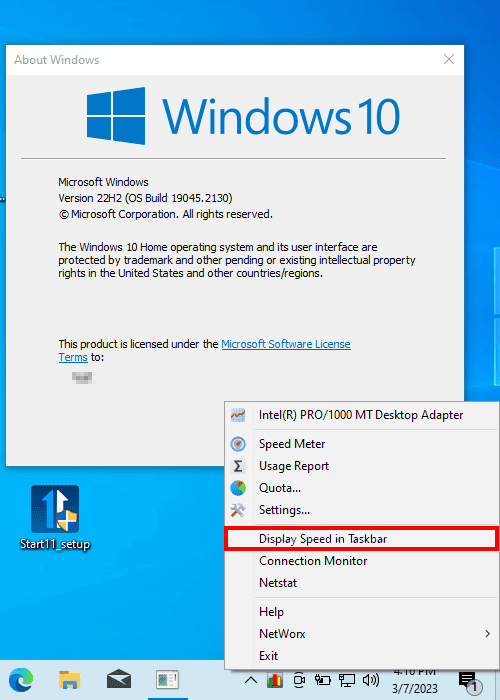
I am using Start11 with NetWorx without "display speed in taskbar" and the problem is gone.