How to stop the application window from opening at startup
3 posts · Closed
Hi,
Upon starting my computer (macOS), the NetWorx Applications window opens. In the System Preferences Login Items I have it set to open the application, but the "Hide" is checked. That works for all other applications, but doesn't seem to for NetWorx.
It's a small thing, but it would be nice to keep it from opening on its own. I have the speed displayed in the menu bar, so I can always easily click there to open any windows.
Thanks,
Roger
There shouldn't be any windows that open automatically, except the floating graph/applications window if the corresponding setting is enabled.
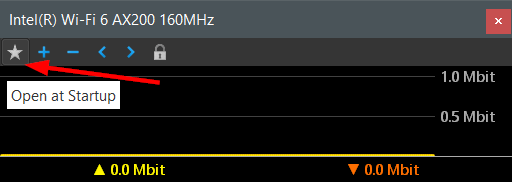
Please check your graph/applications window, and see whether the "star" button is greyed out. If this setting is active, then the window will open at startup. Simply click that button to deactivate automatic opening.
This screen shot is from the Windows version, but this functionality is identical in the macOS version:
Yes, that was the window. I deselected the star. That should do it.
Thanks,
Roger