Floating graphs do not appear automatically on startup
3 posts · Closed
Hi,
I'm using NetWorx on Windows 10 and I have two graphs monitoring one local interface and a router's WAN interface via SNMP.
Every time I restart the computer, although NetWorx starts automatically, I have to click on its tray icon and then click on each of the two configured graphs in order for the floating windows to appear. They appear in the same position where I left them before the restart, but is there a way for these windows to appear automatically when the program starts?
Thanks.
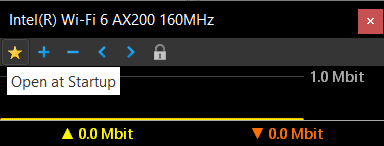
Yes, it can definitely be done. Simply click the star icon above each graph, and they will be automatically reopen on each startup:
That's awesome, thank you.
I have such wallpaper and choose such background colour for my graphs that they blended with the star and I didn't realise that it was there. :)