Taskbar icons get cut off when DPI scaling changes
7 posts · Closed
When the DPI scaling changes (usually happens when connecting to an RDP session on my headless VM), the taskbar icons will get cut off when using the Win 10 taskbar on Win 11 (which is really the only way to use the taskbar graph). In my case, this is happening with StartAllBack. I know this is caused by NetWorx and not StartAllBack because disabling the taskbar graph resolves this behavior.

This is only an issue with small taskbar buttons. It's regardless of icon size.
This can be easily reproduced by having the taskbar graph showing and changing the icon size between small and medium a few times. Eventually, it will cut off.
I did a little more testing. I removed networx.dll and that seems to have helped. It seems that this bug is caused in some part by networx.dll. I recall Andrew in another post telling me that this dll wasn't required. Hopefully this can help with a fix!
Thanks!!
I sent a private message to you guys with easy repro steps in a screen recording, it has some personal info in it hence the private message.
Please try installing the latest build and let us know if there are any changes. This version is designed to limit only the width for horizontal taskbars and the height for vertical taskbars, which should hopefully eliminate any clipping issues.
Thank you so much for your help. This latest update completely fixed the issue.
Thanks for taking care of this. It is much appreciated!!
Just as you guys fixed this, it appears that the legacy taskbar is being removed from 24H2. Fortunately hovering over the system tray icon works super well for seeing bandwidth usage pretty quickly. Just a new habit to develop!
Thanks for the great software.
Our taskbar graph implementation actually supports the native Windows 11 taskbar. While it's not perfect and requires the taskbar to be aligned to the left, it otherwise functions well, even with the latest 24H2 build:
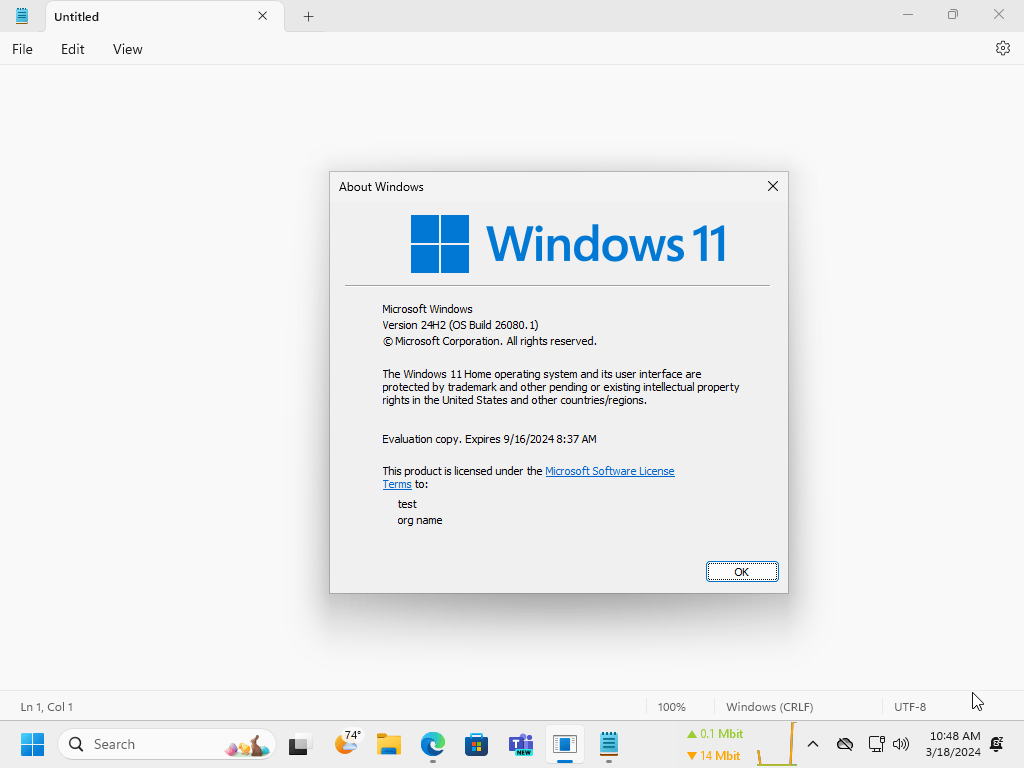
I'm super grateful for that. My problem is I get confused when a lot of windows are opened and icons are grouped with no labels.
So I prefer to work with icons ungrouped which usually causes the icons on the Windows 11 taskbar to overflow with the Networx graph.
It would be great to add an option to make the Networx taskbar graph click through if possible, it would make it more usable with ungrouped icons on the Windows 11 taskbar.