Gap when viewing transfer status in Win 11 systray
3 posts · Closed
Hey guys,
Not sure if this is something I can easily fix. I've already tried reinstalling NetWorx and removing the folder in ProgramData.
I get this gap when viewing the transfer status in the systray with the Win 11 taskbar:
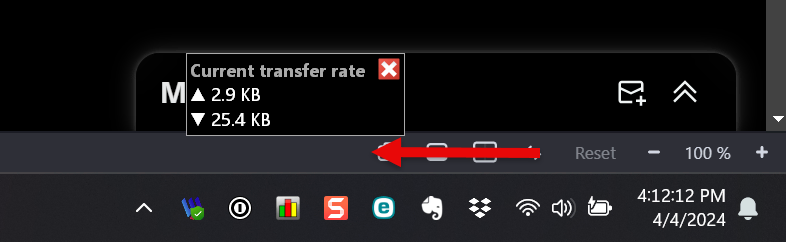
It only happens on one machine, which is a Surface Laptop Studio 2. When I use that machine to connect to a remote VM over an RDP session with a similar setup, I don't get this small gap.
I also get a similar large gap when docking the full graph:

I'm wondering if there is just a setting in Windows I have to change or a registry entry that needs to be reset. If so, I'm not sure what it is.
Thanks.
David
This is, unfortunately, a bug in Windows that only manifests itself on systems equipped with a touch screen, such as the Surface. For some reason, in these cases, Windows incorrectly determines the taskbar size, resulting in a portion of it overlapping with the desktop.
This issue can be easily observed by launching the Snipping Tool, setting the Capture Mode to Window Mode, and then clicking on New. When the screen darkens, click on the taskbar. You will notice that the Snipping Tool has incorrectly captured an additional space above the taskbar:

Thanks for the explanation!