Registry key for error not found in Windows 10
2 posts · Closed
Peter Guest
Hello,
I wouldn't have posted such a trivial error and just corrected it myself, except I can't find it in the Windows 10 registry:
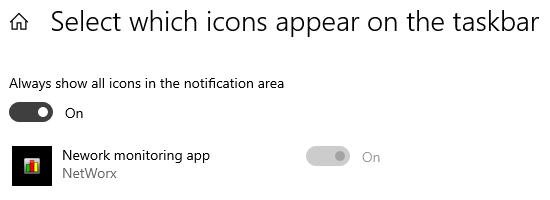
Regards,
Peter
Andrew SoftPerfect
Thank you for bringing this typo to our attention. It has now been corrected and the current version download files have been updated.
Windows stores this data in binary format, so it is unlikely that you will locate it using the Registry Editor. Instead you can reset the notification area icon cache is by using the this batch file. This file automatically deletes the required registry entries and restarts the Windows shell on your behalf. After running the batch file, your notification area icon list will be reset, and the icons should display correctly.
This topic is closed.
It has had no new posts for over a year, so the software versions it talks about may be out of date.
Start a new topic in NetWorx if you have a similar question.