Displaying transfer speeds in Windows 11 system tray
11 posts · Closed
What is the latest solution for getting this to display in the taskbar or system tray in Windows 11? Like other users, I chose NetWorx for its real-time display, so I could glance at the taskbar and see transfer speeds.
I have the latest version of Windows 11 and NetWorx 7.2.1
Thanks
I am not quite sure what solution you are looking for. The latest version of NetWorx should work fine with Windows 11 taskbar and speed widget, as shown below:
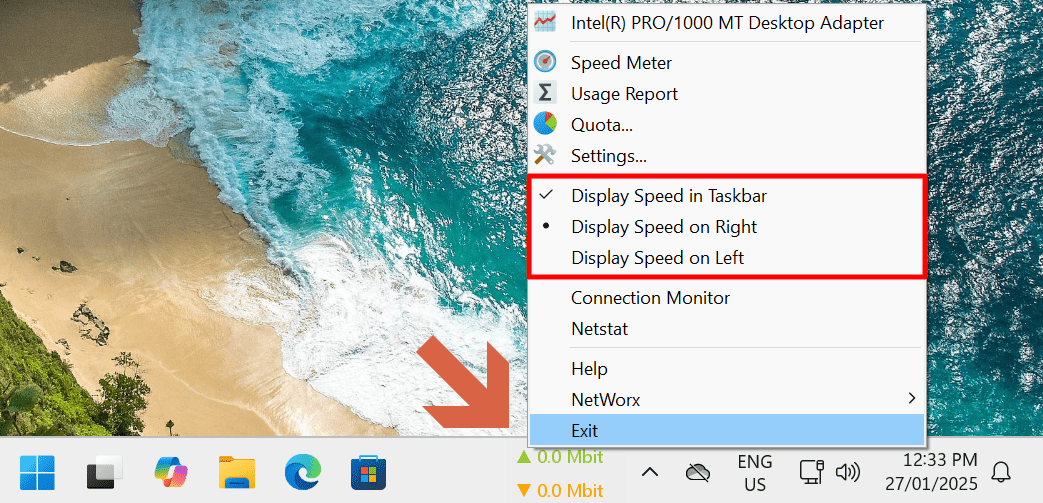
If you are seeing something else, please post a screenshot along with more details about your setup. Having more information will let us help you better.
I can confirm this: After reinstalling Windows 11 Enterprise 24H2 and running the portable version of Networx, no monitor/graph appears. However, Networx is displayed in the taskbar tray, and I can access the settings. The speed widget is set to "Display speed on taskbar"
Sorry, it works now after all! I have three monitors and played around with the settings a bit - now it suddenly appears. However, the monitor is shifted quite far to the left.
It looks like it's simply too large. You can easily resize it.
For that, move the mouse over the left side of the graph. A vertical bar will appear allowing you to expand or shrink its width. Click on that bar and, while holding the left mouse button, move the mouse to the right to change the size of the graph.
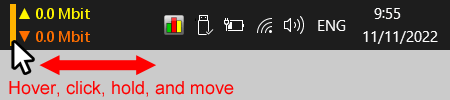
Sorry for forgetting to mention it, but the side adjustment or moving is only possible up to the shown point, leaving this huge gap. It cannot be moved further. After that, the monitor simply disappears. I have reinstalled it multiple times.
I found an old version (7.2) of Networx online and tested it, and it works without any issues. However, the latest version 7.2.1 has the mentioned bug for me.
Thank you for providing the additional details. It seems that the issue you're experiencing is likely related to our new integration with the Windows 11 taskbar, which was introduced in version 7.2.1. While this update was designed to enhance the user experience - such as allowing the graph to be docked on either side of a centered taskbar and play nicely with task buttons - it appears there may be an edge case causing the problem you described.
To help us investigate further, could you please [download the debug version of NetWorx]? Ensure any older version of NetWorx is closed. Then simply unpack the downloaded debug build into a temporary folder and launch it. Upon launching, a console window will appear (as shown below). Please share the output displayed in the console window here. This information should help us pinpoint the issue and work on a resolution.
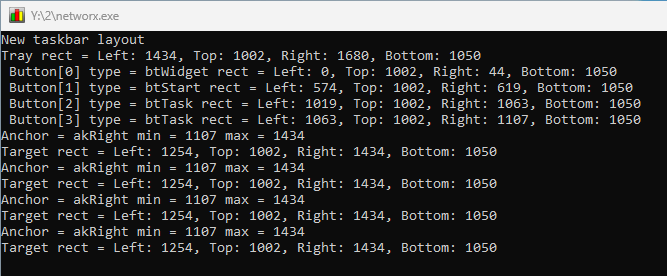
By the way, I also experienced the display bug with the large spacing today using version 7.2.
In the debug version, the Networx display can be moved for now. I'm using a widescreen monitor as my primary display with a resolution of 3440x1440 and 125% DPI scaling. Maybe that has something to do with it.
As requested, here are the data:
New taskbar layout
Tray rect = Left: 3211, Top: 1380, Right: 3440, Bottom: 1440
 Button[0] type = btStart rect = Left: 0, Top: 1380, Right: 69, Bottom: 1440
 Button[1] type = btOther rect = Left: 69, Top: 1380, Right: 124, Bottom: 1440
 Button[2] type = btOther rect = Left: 799, Top: 1380, Right: 1024, Bottom: 1440
 Button[3] type = btOther rect = Left: 1024, Top: 1380, Right: 1249, Bottom: 1440
Anchor = akRight min = 0 max = 0
Anchor info is invalid
Thank you for your feedback! It appears that your taskbar is configured to display task labels, which was indeed an edge case we hadn't fully accounted for.
We've since updated NetWorx to better handle taskbars with labeled task buttons. However, please note that with large task buttons, there may be limited space available for the graph.
You can download the latest update here. Let me know if you encounter any further issues!
Thanks I will test it out :-)
Works so far, everything alright. (tu)