No measurements shown after update
19 posts · Closed
Hello,
I'm experiencing a weird problem that started with the latest update 7.2.2. The app does not show any measurements.
My settings, taskbar widget, its size and everything is kept correctly, but there is no data to show. It is like it cannot see any traffic through my network adapters.
Uninstalled 7.2.2 and tried 7.2.1 since I had kept the setup file. Does the same, though 7.2.1 worked fine until 7.2.2 install.
Found and downloaded 7.2.0 and it works correctly.
It's hard to tell without seeing your settings. Please attach a screenshot of the Main tab in the Settings.
The same problem here reverted to 7.2.1, and all is well again.
Bog standard RealTek adaptor.
As mentioned above, it would greatly help to see your settings. The more information we have, the higher is the chance of finding the cause of the problem.
I have exactly the same problem - after the upgrade to 7.2.2 the taskbar graph as well as standalone graphs I open do not show any speed measurements, download and upload speed sit at 0 MB all the time.
Interesting thing is that when I opened the Usage report it seems that there are data collected for those last days I have this problem with 7.2.2.
I'm attaching the screenshot of dead Taskbar graph, Settings and Usage report.

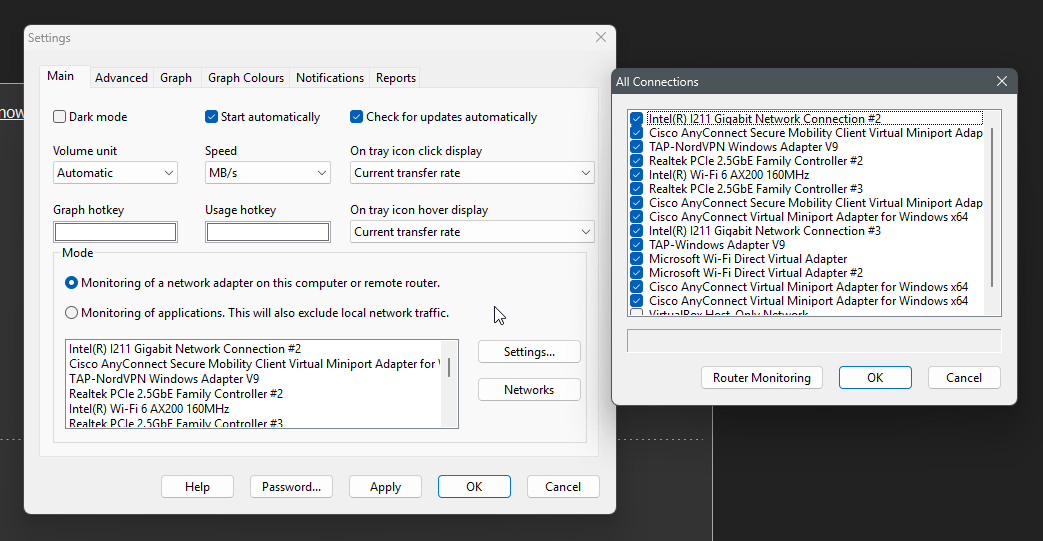
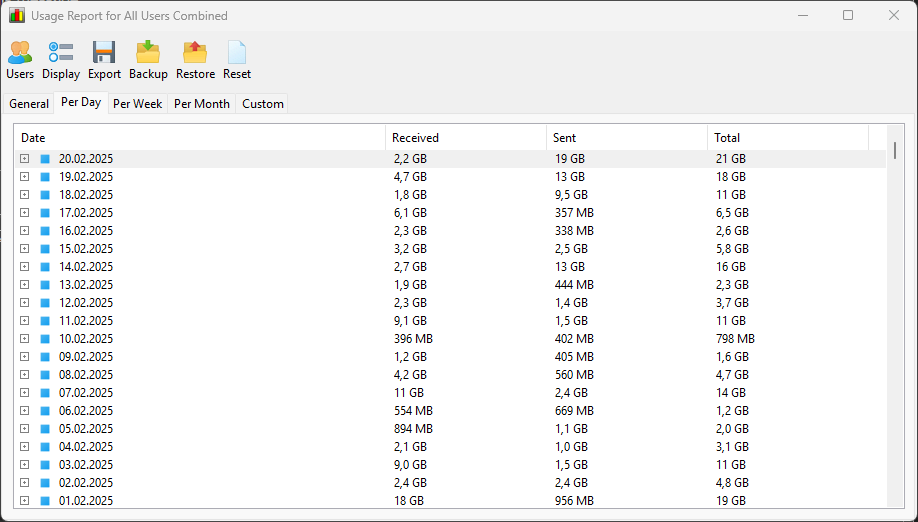
On 7.2.0
[image: https://i.ibb.co/XfKTMm8t/Networx720-settings.jpg]
[image: https://i.ibb.co/WN5mhWNj/Networx720-taskbar.jpg]


On 7.2.2
[image: https://i.ibb.co/LVzsdbL/Networx722-settings.jpg]
[image: https://i.ibb.co/QF7jCzzv/Networx722-taskbar.jpg]


This issue is related to the fact that we have updated the adapter selection process in version 7.2.2. As a result, only online network adapters with a valid IP address can now be monitored.
To exclude any confusion with old adapter names, could you all please try the portable version? Launch it, open the adapter selection dialog, check all the adapters you wish to monitor and let us know how it works for you.
Example:
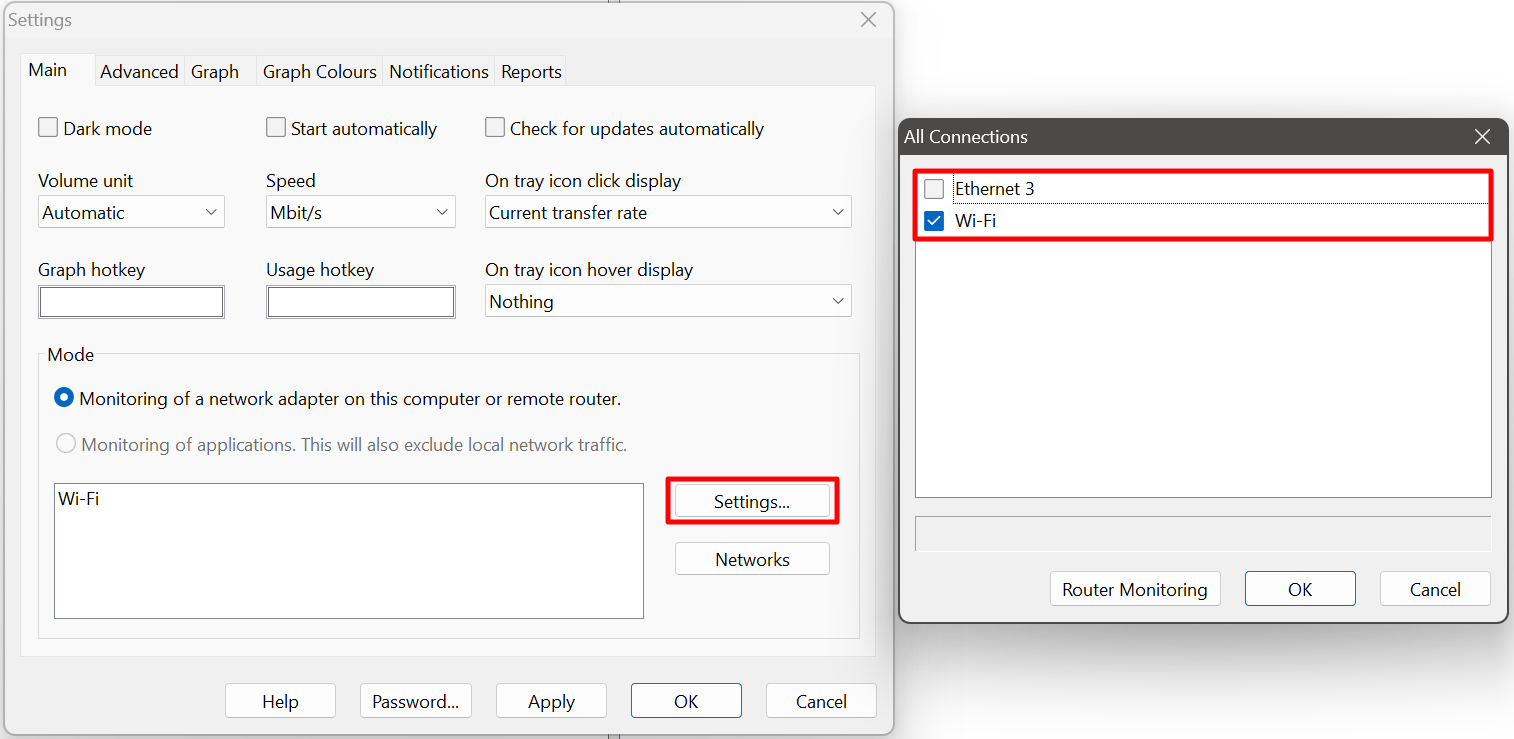
It does exactly the same as the normal 7.2.2 version.
No matter which adapter i choose, it shows no data passing through.
[image: https://i.ibb.co/Ndk3VLMs/Networx-722p.jpg]

I'm on windows 11 Pro, build: 26100.3194 if that helps anyway.
I should also note that both ethernet adapters i usually monitor have DHCP applied IP settings and are both used almost all the time.
I also tried portable version and it behaves exactly the same as regular version, the speed meter is dead.
In both versions in the interface dialog I purposefuly did select only the active network interface with IP address so I think that is not the problem, at least from I can tell at this surface level.
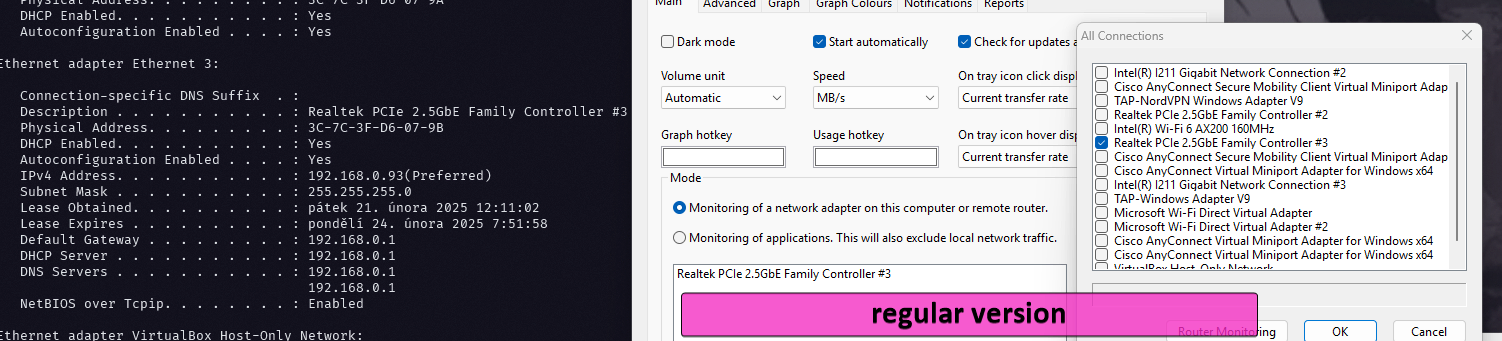

The active interface is there present in the settings dialog and is selected for monitoring.
The only difference between portable and regular version is interface name. In the regular version it seems contain the system interface description value while in portable version it seems like some Networx arbitrary naming. But the behavior is the same for both versions so I assume the naming differnce in the setting dialog is not the problem and stems from some naming algorithm change between old and new Networx versions as my regular version was installed long time ago and was upgraded many many times and keeps the interface name created years back while portable version used some new approach to name interfaces.
Thank you all for sharing your findings here. I believe we've identified the root cause of the issue - it was a simple oversight, for which I sincerely apologise.
We inadvertently relied on the IPv6 adapter index when querying usage statistics. In a typical dual-stack system, the IPv4 and IPv6 adapter indices are the same, and everything works well. However, in these cases, when IPv6 is unavailable or not configured, such query would fail.
I believe we've fixed the issue, so please download the latest build and let me know how it works for you. I truly appreciate your feedback, and I apologise again for allowing such a trivial bug to slip into production.
Everything back to normal!
Excellent support, thank you very much.
The pre-release version is working for me. Thanks, Bob Kaiser
Speed meter is working again, thank you very much (tu)
The pre-release 7.2.2 was showing some instability, SQL database error message. Windows desktop was becoming unstable, taskbar frozen. uninstalled the pre-release version. Will check the site for updates periodically. Did not save the previous 7.2.0 version.
Robert, please provide more information about the instabilities and post the exact text of the error. Otherwise, without detailed information, it is impossible to diagnose the problem.
After I had uninstalled the pre-release version, today, I downloaded the released 7.2.2 and installed that. The setup went through a first-time install, no restart required. The settings identified my ethernet as Local Area Connection. The graph (polyline) is showing activity on the connection.
Ann, sorry I didn't see your message before I posted the later message about re-install.
Bob Kaiser
That's ok Robert. Most important is that the app is working properly now.