How to show graph as a window instead of taskbar icon
3 posts · Closed
Hi,
I was using the free version of NetWorx (5.5.2) but decided to buy a license. With the new version (7.2.2), how do I show the graph as a window, and not on the taskbar? It's way too cluttered on my taskbar, and hard to read. I prefer it to be a stand-alone window like in version 5.5.2.
Thanks for any help. Take care.
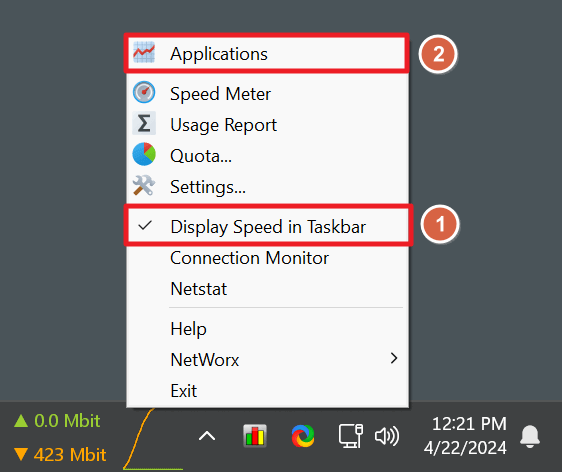
NetWorx can display the graph either in the taskbar or in a floating window.
To enable the floating graph, simply
(1) untick 'Display Speed in Taskbar' in NetWorx pop-up menu; and then
(2) depending on your selected monitoring mode, click either your monitored network name or the 'Applications' menu item.
Hi,
Thanks so much for your quick response. So sorry for my "user error".
Your help worked! But I also had to press the "reset window" button.
Thanks again.
Take care
Steve