Renaming network adapter and database corruption
2 posts · Closed
First of all, I want to thank you for supplying what I consider to be the best network monitor for Windows out there.
I need some help with renaming my network adapter and restoring the app, as I might have corrupted my NetWorx database in doing so.
Recently, I renamed my adapter via the Windows registry, as the original adapter name 'Realtek PCIe GbE Family Controller #3' was too long. I then edited NetWorx.db3 to reflect the changes I made to the adapter. I can't remember what happened exactly, but I think it didn't load the original settings and database. I made a backup before and then restored it, but it appears the database is corrupted now and is missing some data (I attached the file).
[[NetWorx.db3]]
If you prefer to have a more user-friendly network adapter name, the easiest and safest way is to rename the adapter directly within NetWorx app using the right-click menu:
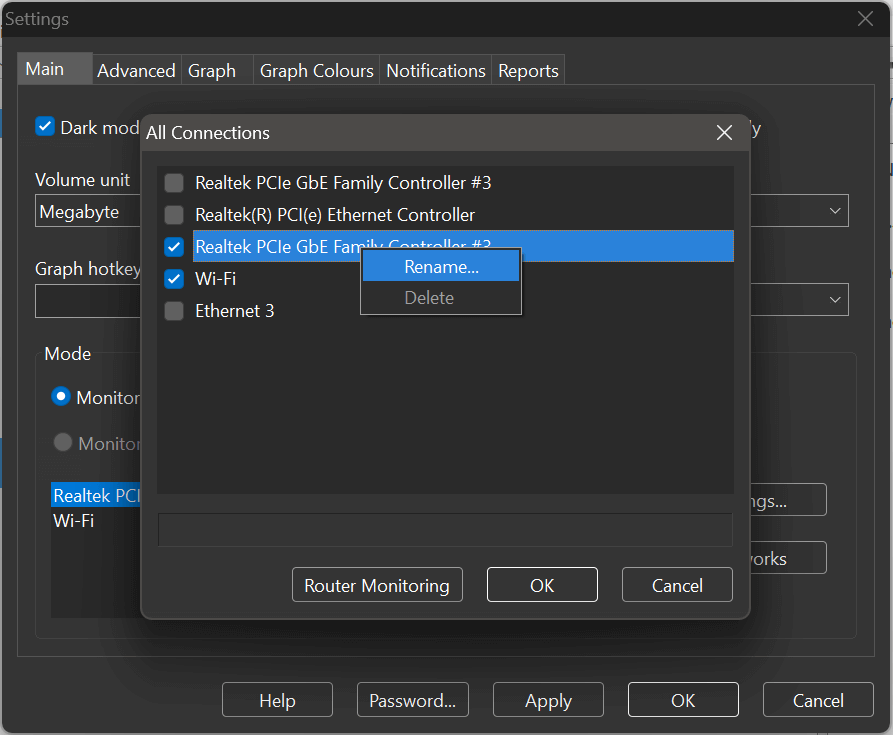
This way you won't risk creating the problems that you have recently experienced after editing the registry and the database.
The database that you attached isn't actually corrupted. Rather, your system assigned a new ID to your network adapter. Since the previous copies with the old ID were made inactive, their usage records became hidden.
If you are using an SQLite manager, you can run the following SQL query to reassign all usage data to the most recently added adapter:
UPDATE OR IGNORE USAGE SET ADAPTER_ID = 3
Please ensure NetWorx is closed before executing this query.