Taskbar display cluttered with decimal settings
4 posts · Closed
When I set the number of decimals to 3, the taskbar display becomes cluttered and hard to read. With 0 decimals, it looks fine. I'd like an option to always show whole numbers in the taskbar, and also an option to display only the graph without the numbers.
See the attached picture for more details.
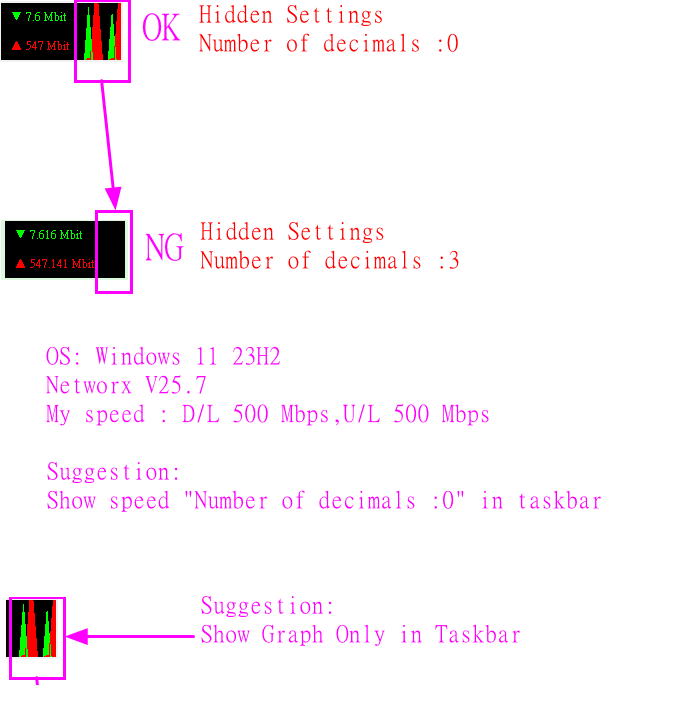
If you set the Number of decimals to a custom value, it will apply everywhere in the app, including both graphs and speed reporting.
With 3 decimals, the labels naturally become longer, leaving less room for the graph, which may then become hidden. You can increase the size of the graph if you'd like to fit both the longer labels and the graph together.
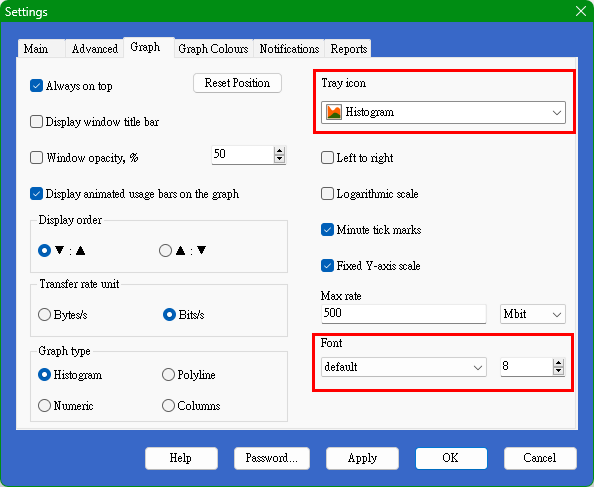
If you prefer to see only the graph without any labels, there is a separate option called Tray icon: Histogram. Please note that this is a very small graph with limited detail, but it may suit your needs if you want a numbers-free display.
Now I set font Default and Size 8.
It works.
I set Tray icon: Histogram
It still has text.
See attached picture for more details.
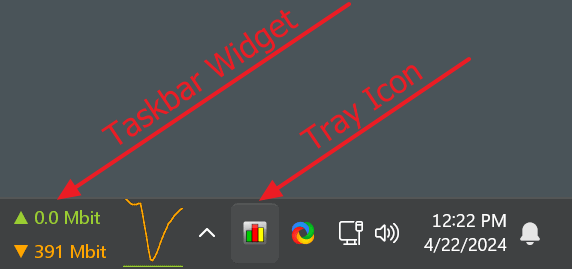
You are probably still looking at the taskbar widget, whereas the setting highlighted in your screenshot refers to the tray icon: