Live network traffic graph disappeared from taskbar
2 posts
I updated to the newest version of NetWorx, and after that the live network traffic graph disappeared from the taskbar.
I tried changing settings, restarting, etc., but the graph has not reappeared. The upload and download speeds are showing, but not the graph.
The taskbar graph has been improved it to include the Y-axis with one or two labels depending on your chosen font and taskbar size. However, if there isn't enough space in your taskbar, these labels and the graph itself may be automatically hidden by Windows.
To resolve this, simply resize the taskbar graph area slightly, as shown below - and the graph should become visible again.
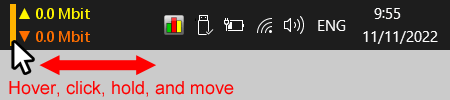
Mouse-hover the traffic figures, click the vertical line that appears, and move it to the point where you are happy with the displayed information.