Taskbar widget shows rates or graph but not both
3 posts
Since upgrading to 25.12, I noticed that the taskbar widget will show me upload/download rates or the graph, but not both. As a sanity check, I reinstalled version 25.7 and saw both the upload/download rates and the graph. In version 25.7, there is no Taskbar Widget Setting selection on the pop-up menu; in 25.12, this selection seems to let you select "Display Upload/Download rates" and "Display the Graph", but if I select both, I only see the up/down rates. If I select "Display the Graph", I do see the graph but not the upload/download rates.
Is this by design?
The upload/download rates and the graph can be displayed in any combination: rates only, graph only, or both together. When the graph is enabled, it can also be shown with or without labels.
From your description, it sounds like there is not enough horizontal space available for the taskbar widget. When space is limited, the widget will prioritise one element and hide the other, even if both options are enabled.
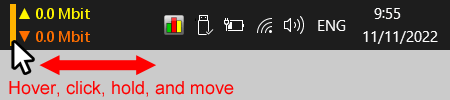
Depending on your settings, the newer version may require a little more space, that's why you don't see this issues in the older version. To fix it, simply resize the widget - and both the graph and the upload/download rates should display together.
Mouse-hover the NetWorx display in the taskbar, click the vertical line that appears, and move it to the point where you are happy with the displayed information: