Applications without file description are merged
4 posts
I just updated NetWorx since... I forgot my last version before was 7.x? And I noticed a change in the Applications tab that they are now listed by their file description instead of their full paths. Which is okay...
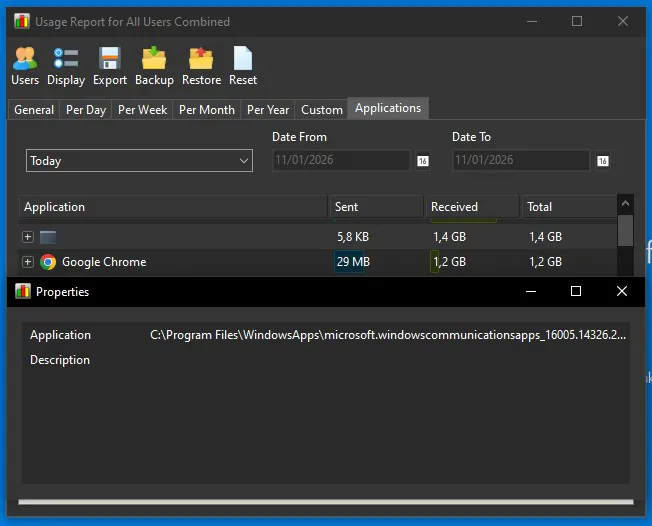
However, I’ve run into an issue where all applications that do not have a file description are being merged into a single row. As a result, it’s no longer possible to distinguish which application is actually using the bandwidth.
For example, in the attached screenshot there is a single entry showing about 1.4 GB of usage. I believe this traffic is coming from aria2c, which does not have a file description. Because of that, it appears to be incorrectly grouped and labeled as microsoft.windowscommunicationsapps, which I believe has been replaced by Outlook since last year?
I think each app without a file description should still be listed separately (and also show the file path) rather than being merged into a single entry. Wdyt?
Thank you for the detailed feedback. You pointed out an edge case that wasn't considered in NetWorx. We will implement an improvement and post an update here soon.
We've just published an update that changes the grouping logic to use the EXE name together with the file description. With this approach, applications that have an empty or identical description but belong to different executables will no longer be merged into a single entry.
Please download the latest build and update your installation. The affected entries should then be correctly ungrouped and shown separately.
Thanks again for taking the time to report this and for the detailed explanation — it was very helpful.
I just realized that zerotier-one_x64.exe, which also doesn't have file description, were listed as "zerotier-one_x64.exe" before that snapshot. So... I think I missed some migrations between NetWorx 5.x -> 7.x for that aria2c.exe...?
Also thanks, I just tested the snapshot and it's now separating the blank ones :D