NetWorx widget gets hidden when taskbar is full
6 posts
Hello, I'm using NetWorx 26.1 on Windows 11 and Open-Shell 4.4.196 (the latest). When my taskbar becomes full, the NetWorx widget gets hidden. It looks like NetWorx does not reserve a dedicated slot in the taskbar. This didn't happen on Windows 10.
Amazing piece of software nonetheless. Thanks for creating it and continuing to improve it over the years (tu)
Thank you for the kind words — much appreciated!
You're right that this behaviour changed from Windows 10. In the older version, NetWorx used a Windows mechanism called a "deskband" — a proper taskbar extension with a reserved slot. Microsoft removed deskband support entirely in Windows 11, so we had to rearchitect the NetWorx widget as a floating window that sits visually on top of the taskbar. It works, and is definitely better than nothing, but Windows no longer treats it as a native taskbar element, so it has no awareness of how much space is occupied and won't reserve room for itself when things get crowded.
Unfortunately there is no clean workaround on our end until Microsoft provides a proper replacement API (if ever). In the meantime, you can free up some taskbar space by disabling button labels or turning off the Search box in taskbar settings — that usually helps.
Would it be possible in a future version to display the Traffic Information in the System Tray?
Isn't that what NetWorx already does - displaying traffic information in the system tray? Please describe in more detail what you'd like to see.
What appears in the system tray is the application icon, not the traffic information (transfer speeds). I want the traffic information to appear there.
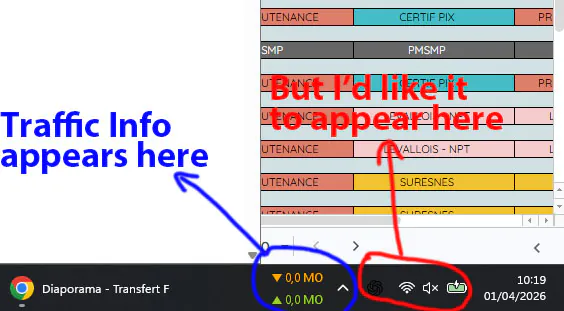

If you mean the taskbar widget: it cannot be positioned amongst application icons in the notification area. Windows uses that space only for icons.
If you mean the on-hover/on-click popup window with transfer rates: it always appears near the mouse cursor. Displaying it near the notification area icons would not make sense when the taskbar widget is aligned to the left (e.g. Windows 11 with the Start menu centred).