NetWorx taskbar widget missing after Windows 11 update, Show on Right greyed out
8 posts
Dear SoftPerfect Support Team,
I am experiencing an issue with NetWorx 26.10 following a Windows 11 Pro Insider Preview update installed on Saturday, 31/10/2026.
System Information:
- Operating System: Windows 11 Pro Insider Preview, Version 26H1
- OS Build: 28120.3393
- NetWorx Version: 26.10 (64-bit)
- Configuration: Dual-monitor desktop workstation
- Network Connection: Ethernet 2
Problem Description:
Immediately following the Windows update, the NetWorx taskbar widget stopped displaying live upload/download speeds.
NetWorx itself continues functioning normally. The system tray icon is accessible, network traffic statistics are being recorded correctly, and the separate Ethernet monitoring graph displays live upload/download activity without issue.
However, neither the numerical speed indicators nor the graphical taskbar widget appears.
Troubleshooting Already Undertaken:
- Disabled and re-enabled "Display Speed in Taskbar".
- Confirmed "Display Upload/Download Rates" is enabled.
- Tested the widget on both monitors independently.
- Restarted Windows Explorer.
- Completely exited and restarted NetWorx.
- Tested all four Windows taskbar positions: Bottom, Top, Left and Right.
- Confirmed Windows taskbar size is set to Default.
- Enabled "Display the Graph" within NetWorx taskbar settings.
- Checked Windows Event Viewer for application errors when activating the widget. No corresponding errors were recorded.
- Confirmed that the standalone Ethernet traffic-monitoring graph operates correctly.
None of these actions restored the taskbar display.
Assessment and Support Request:
As NetWorx operated correctly before the Windows update, and all other monitoring functions remain operational, I suspect a compatibility issue between the latest Windows Insider build and NetWorx's taskbar integration.
Could you please advise:
- Is this a known issue with Windows 11 Insider Build 28120.3393?
- Is there an available fix, workaround or updated NetWorx build addressing this problem?
- Are there any additional diagnostic checks you would recommend?
I would prefer to avoid reinstalling Windows or rolling back the update, as the operating system is otherwise functioning normally.
Thank you for your assistance.
Kind regards,
David
Dear SoftPerfect Support Team,
Further to my original report, I have conducted additional troubleshooting and discovered the following:
1. ASUS Notebook Comparison
My ASUS notebook is running the identical Windows 11 Pro Insider Preview Build 28120.3393 and NetWorx 26.10. The NetWorx taskbar widget functions perfectly, displaying both upload/download speeds and the traffic graph.
2. Desktop PC – Single-Monitor Test
This morning, Sunday, 01/11/2026, I physically disconnected my second monitor and rebooted the desktop PC with only one monitor connected.
I repeated the previous troubleshooting procedures, including restarting NetWorx and Windows Explorer, but the taskbar widget still failed to appear.
3. Updated Findings
Both computers run the same Windows build and NetWorx version.
NetWorx network monitoring functions correctly on both computers.
The taskbar widget works on the ASUS notebook but not the desktop.
The desktop problem persists even with a single monitor connected and following a complete reboot.
These findings suggest the issue may be specific to the desktop's Windows installation or taskbar integration rather than a general incompatibility with the latest Insider build.
I would appreciate any further diagnostic recommendations or potential fixes.
Kind regards,
David
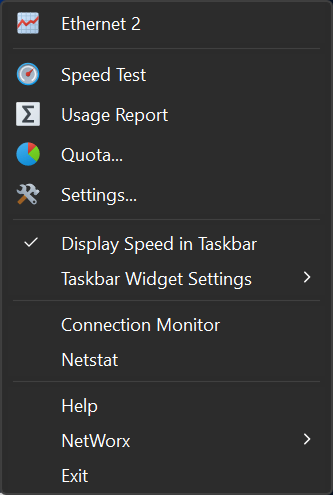
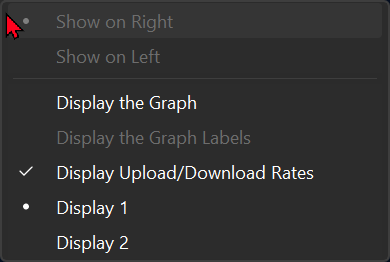
We have no other reports of this on build 28120.3393 yet, but your screenshots narrow it down. Show on Right and Show on Left are both greyed out, which means NetWorx can read the taskbar but can't find a valid space on it for the widget. In that case it simply doesn't place the widget and reports no error, so Event Viewer stays quiet and restarting makes no difference.
Probably something on the desktop's taskbar is different, such as an item NetWorx doesn't recognise. Two machines on the same Insider build can still differ, as Microsoft often rolls features out per device.
With the taskbar back at the bottom and the widget missing, could you send a screenshot of the whole taskbar? I have also e-mailed you a small diagnostic tool, TaskbarProbe. It only reads the taskbar and writes what it finds to a text file on your desktop. Please send that back too.
Also check Settings → Personalisation → Taskbar → Taskbar behaviours → Taskbar alignment. If it is set to Left, change it to Centre and select Show on Left in the widget settings if it becomes available. That may get the widget back in the meantime.
Did you install 26.10 shortly before the Windows update? It came out on 27 October and changed how the widget finds its position, so I'd like to rule that out.
Dear SoftPerfect Support Team,
I have made an important discovery regarding my previously reported taskbar widget problem.
My ASUS notebook was running an older NetWorx 7.x version under Windows 11 Pro Insider Preview Build 28120.3393, and the taskbar upload/download speed widget was functioning perfectly.
This morning, Sunday, 01/11/2026, I upgraded the notebook to NetWorx 26.10.
**Immediately following the upgrade, the taskbar widget disappeared, exactly as it had on my desktop PC.**
Both computers now run Windows Build 28120.3393 and NetWorx 26.10, and neither displays the taskbar widget.
This strongly suggests a compatibility issue or regression introduced in a newer NetWorx version rather than a problem specific to my desktop configuration.
Could you please investigate and advise whether a previous version can be safely installed for comparison, or whether a corrected/test build is available?
Kind regards,
David
Hi Andrew,
Thank you for your assistance. I have made some progress following your recommendations.
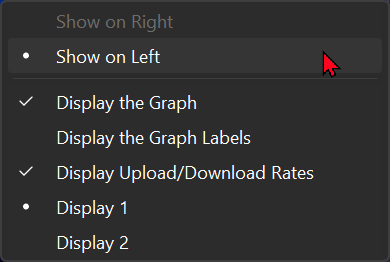
Changing Windows taskbar icon alignment from Left to Centre makes the NetWorx Show on Left option available. Selecting it successfully restores the upload/download speed indicators and traffic graph.
I have also corrected the display arrangement so that Display 1 is my left-hand primary monitor and Display 2 is my right-hand monitor.
The NetWorx widget is now functioning on Display 1, but it appears at the extreme left of the taskbar.
The remaining issues are:
NetWorx only displays its widget when Windows taskbar icon alignment is set to Centre.
Show on Right remains greyed out.
Returning Windows taskbar icon alignment to Left causes the widget to disappear.
I would prefer to retain left-aligned Windows taskbar icons and have the NetWorx widget positioned towards the right-hand side of my primary taskbar, as it was with NetWorx 7.3.x.
Could you please advise whether the positioning behaviour introduced in NetWorx 26.10 can be corrected, or whether a workaround is available to restore the previous arrangement?
Kind regards,
David
Regarding the install of 26.10, it must have been installed before yesterday (Saturday) morning, as that was when the Windows Update came through.
The log is attached as requested along with Taskbar shot of this morning, and another of a few moments ago.....


Your log shows the cause. On build 28120.3393 Windows lists the notification area icons among the taskbar's app buttons, so NetWorx sees a tray icon where it expects the last app button and finds no valid space on the right. The same check has been there since 7.2.1, so it isn't new in 26.10.
I have fixed it so NetWorx steps back past those icons. The fix is in the current NetWorx 26.10 download, so please install it over your current copy. Then:
- Set
Settings → Personalisation → Taskbar → Taskbar behaviours → Taskbar alignmentto Left. - Select Show on Right in the widget settings.
The widget should then appear just left of the notification area. Show on Left will stay greyed out with left-aligned icons, because it uses the space to the left of Start. Let me know if this works.
Hi Andrew,
Many thanks…..it worked!
Refer to screenshot!
So, the taskbar icons are again to the left, and the NetWorx widget is to the left of the hidden icons part of the taskbar!
Perfect!
In regards to my ASUS notebook….sadly, I am only sure it was version 7.x, I seem to want to say 7.3…..but I wouldn’t be as certain! As I was wondering why I hadn’t updated that version.
But now I can make that work just like my desktop version.
Again, many thanks for your prompt and clear responses.
Regards,
David
