Cannot exclude local traffic and count VPN traffic
4 posts · Closed
My router is at: 192.168.0.1
My local network is: 192.168.0.2 up to .255
My remote network is: 10.1.11.0 up to .255
I'm on NetWorx 6.2 and in my IP Address Range Manager I don't have any 10.1.11.0 ranges, and I've tried changing the 192.168.0.0 to instead be 192.168.0.2 to 192.168.0.255 (thinking that maybe then it would count traffic sent to the router).
I'd like to exclude my actual local traffic, and count traffic sent to the VPN (since that is not truly local), but I can't seem to get the config right.
Does it matter perhaps that I have configured several of the remote machines in my local hosts file (so that I can access them by host name locally), and that those machines are being accessed via their host name (and not by IP)? I tried also sending something large to one of the remote machines via IP address and not host name and it still didn't seem to get registered as non-local traffic.
Thanks!
I can say for sure that anything added into local hosts file would not affect monitoring. It's simply a map of names to IP addresses, which does not change anything other than name resolution.
However regarding excluding local traffic while including VPN, I'd like to take a look at your IP configuration and the entries under the IP Address Range Manager. If you could post here the following items, I may be able to give better advice:
- A complete output of ipconfig /all > somefile.txt launched in a command prompt. and;
- A screen shot of the entries under IP Address Range Manager.
Cool, thanks, here you go! :)
Windows IP Configuration

   Host Name . . . . . . . . . . . . : ARAGORN
   Primary Dns Suffix  . . . . . . . :
   Node Type . . . . . . . . . . . . : Hybrid
   IP Routing Enabled. . . . . . . . : No
   WINS Proxy Enabled. . . . . . . . : No
   DNS Suffix Search List. . . . . . : ZyXEL-USG

Ethernet adapter Local Area Connection 2:

   Media State . . . . . . . . . . . : Media disconnected
   Connection-specific DNS Suffix  . : ZyXEL-USG
   Description . . . . . . . . . . . : Intel(R) I210 Gigabit Network Connection #2
   Physical Address. . . . . . . . . : 78-24-AF-84-BC-A8
   DHCP Enabled. . . . . . . . . . . : Yes
   Autoconfiguration Enabled . . . . : Yes

Ethernet adapter Local Area Connection:

   Connection-specific DNS Suffix  . : ZyXEL-USG
   Description . . . . . . . . . . . : Intel(R) I210 Gigabit Network Connection
   Physical Address. . . . . . . . . : 78-24-AF-84-BC-A9
   DHCP Enabled. . . . . . . . . . . : Yes
   Autoconfiguration Enabled . . . . : Yes
   Link-local IPv6 Address . . . . . : fe80::4178:b67f:f4c4:822d%4(Preferred)
   IPv4 Address. . . . . . . . . . . : 192.168.0.3(Preferred)
   Subnet Mask . . . . . . . . . . . : 255.255.255.0
   Lease Obtained. . . . . . . . . . : Thursday, May 31, 2018 8:33:32 PM
   Lease Expires . . . . . . . . . . : Saturday, June 09, 2018 1:56:10 PM
   Default Gateway . . . . . . . . . : 192.168.0.1
   DHCP Server . . . . . . . . . . . : 192.168.0.1
   DHCPv6 IAID . . . . . . . . . . . : 91759791
   DHCPv6 Client DUID. . . . . . . . : 00-01-00-01-1C-0F-B9-78-78-24-AF-84-BC-A9
   DNS Servers . . . . . . . . . . . : 192.168.0.1
   NetBIOS over Tcpip. . . . . . . . : Enabled

Tunnel adapter Teredo Tunneling Pseudo-Interface:

   Connection-specific DNS Suffix  . :
   Description . . . . . . . . . . . : Teredo Tunneling Pseudo-Interface
   Physical Address. . . . . . . . . : 00-00-00-00-00-00-00-E0
   DHCP Enabled. . . . . . . . . . . : No
   Autoconfiguration Enabled . . . . : Yes
   IPv6 Address. . . . . . . . . . . : 2001:0:4137:9e76:1c6e:2c12:b8c0:d7d8(Preferred)
   Link-local IPv6 Address . . . . . : fe80::1c6e:2c12:b8c0:d7d8%3(Preferred)
   Default Gateway . . . . . . . . . : ::
   DHCPv6 IAID . . . . . . . . . . . : 218103808
   DHCPv6 Client DUID. . . . . . . . : 00-01-00-01-1C-0F-B9-78-78-24-AF-84-BC-A9
   NetBIOS over Tcpip. . . . . . . . : Disabled
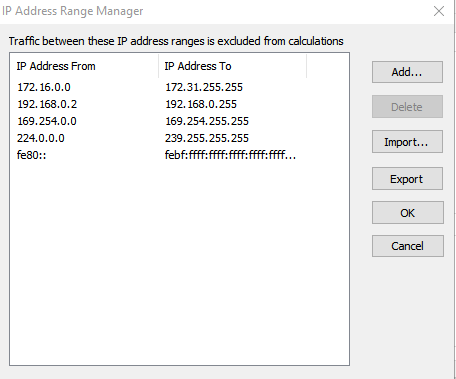
Hmm, that's quite strange as theoretically removing 10.x.x.x from the ignored IP address list should have worked.
It may have something to do with how the VPN software tunnels traffic. I'd recommend to try using an alternative network driver as follows:
- Download and install WinPCap.
- Restart NetWorx and untick Ignore local traffic within the LAN.
- From the now-available drop-down list of interfaces choose your network adapter prefixed like this:
Ignore local traffic within the LAN: Intel(R) I210 Gigabit Network Connection
This should now use the WinPCap driver and filter traffic at a lower level, so hopefully VPN traffic will now be metered.