Change database location to another folder
6 posts · Closed
Hi, is it possible to change the database from "C:\ProgramData\SoftPerfect\NetWorx" to another folder?
I am using a different partition to store all my data, and I will be very happy if I can put the database (3 files) on this partition in its own folder. Sometimes I have to reload an image of my Windows partition, and I often forget to make a backup of the database.
Yes, it's possible to change the database location. There are two ways to do so:
- Quit running NetWorx and launch it again as administrator. Then go to the Hidden Settings and enter the new path under Database location.
Alternatively, use a symbolic link to redirect the folder to another location. This method can be used for any program to redirect a folder to a different location.
- Quit NetWorx to close the database
- Move C:\ProgramData\SoftPerfect\NetWorx to a desired location.
- Launch a command prompt as administrator and type
mklink /D C:\ProgramData\SoftPerfect\NetWorx D:\YourNewLocation\NetWorx
Now any I/O to C:\ProgramData\SoftPerfect\NetWorx will be redirected to D:\YourNewLocation\NetWorx.
Many thanks to you, these settings work as expected.
Sorry to bump an old thread, but I have a question regarding "Method 1" above:
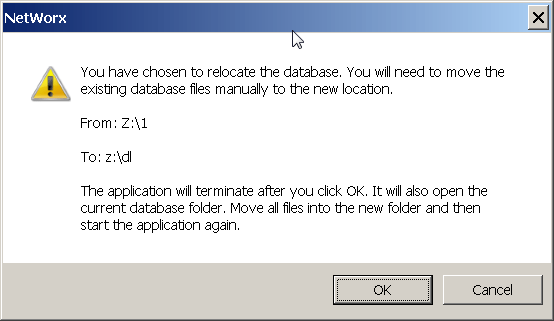
By changing "Database location" in hidden options, will Networx move the database for me? Or do I have to move the database manually before launching Networx? If I have to manually relocate the database beforehand, what about the brief interval between starting Networx and setting "Database location" to point to the new location? I'm asking because I guess there might be a danger of manually relocated database being overwritten after setting "Database location".
Thanks!
Once you change the Database location parameter in NetWorx, it will instruct you what to do next. It's quite simple:
Thanks for the instruction, seems perfect!