Blank bar for WAN interface when monitoring wireless
2 posts · Closed
John Vezirian Guest
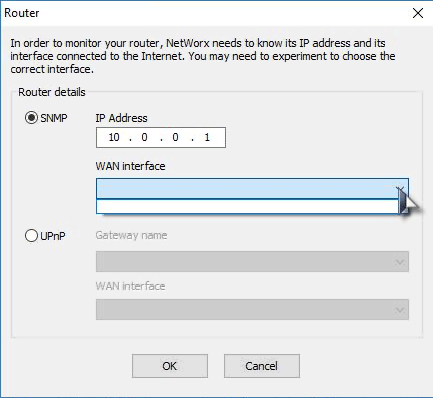
I am trying to set up NetWorx to monitor my wireless. I have an Xfinity router:
Vendor: ARRIS Group, Inc.
Model: TG3482G
I am trying to set it up so I can monitor my Wi-Fi usage. I put in the address for the router (see picture), but all I get is a blank bar for the WAN interface. I have tried to edit the hidden settings, but to no avail. I was wondering if anyone has a walkthrough for this?
I have tried the UPnP and get pretty much the same. Hoping someone can help me out.
Andrew SoftPerfect
Not every router can be monitored. To be able to monitor a router, NetWorx needs a router to either:
- Support the so-called SNMP protocol. In some routers it needs to be enabled and configured, but some may not support it at all. Unfortunately we don't have a TG3482G at hand to check, so it's best if you contact your ISP and ask them whether the router supports SNMP and how to enable it. Or:
- Support the service called WANCommonInterfaceConfig in its UPnP implementation. Likewise, in some routers this feature is present and active out of the box, while in others it may need to be enabled (e.g. by allowing applications to set up port forwarding).
I am afraid we aren't really able to provide assistance for a specific router model. It's best to contact the supplier or vendor directly.
This topic is closed.
It has had no new posts for over a year, so the software versions it talks about may be out of date.
Start a new topic in NetWorx if you have a similar question.