Icon is gray and graph shows no network activity
2 posts · Closed
Buck Guest
NetWorx worked fine until recently. Now the icon in the bottom right corner of the screen is not in color (just gray) and the graph shows no network activity. I tried re-installing it, but no joy. How can I get this solved?
Ann SoftPerfect
This indicates that the network adapter previously chosen for monitoring is no longer available.
To solve the problem, simply right-click the notification area icon, go to Settings - Main tab, and choose the correct adapter in the Monitored Interfaces drop-down list:
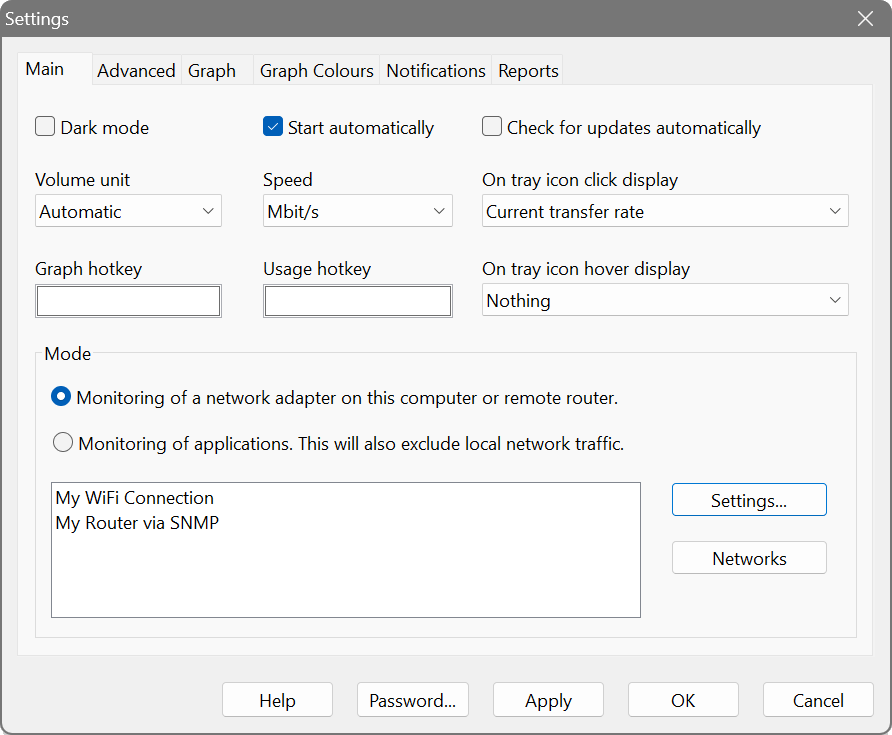
If that does not resolve the issue, click the Networks button in the same pane and there choose All Networks to be monitored.
This topic is closed.
It has had no new posts for over a year, so the software versions it talks about may be out of date.
Start a new topic in NetWorx if you have a similar question.