Running NetWorx on Ubuntu 16.04 via Wine
6 posts · Closed
Hi,
I bought NetWorx on 22 Dec 2018. I have installed it on two Windows 10, 64-bit PCs without any problems.
Now, I would like to install it on an older 32-bit PC working with Ubuntu 16.04 LTS. First, I downloaded the networx_linux_amd64.deb package. The installation under Linux did not succeed (nothing appeared), probably because of the 32-bit system. So I have downloaded the last Windows portable version of NetWorx and I tried to run it under Wine environment. A floating point error. Finally, I downloaded an older NetWorx version (5.5.5 portable) and tried to run the exe file under Wine. In this case, NetWorx opened normally, but I could not obtain any network connection, and the graph remained empty. The settings are grayed out and therefore cannot be modified.
Do you have a solution?
Thanks in advance for your answer.
Best regards,
Alain
I am afraid we only have builds for x64 architecture. Offering builds for other platforms would mean more time and resources dedicated to testing and maintenance, while the market share of desktop Linux is very small, and the market share of non-64-bit systems is now even smaller.
However, our Windows programs normally run well under Wine. In your case try the following:
- Update Wine to version 5.0.
- In NetWorx, go to the Hidden Settings (press Ctrl + letter 'O') and set Physical Adapters Only to False. Then restart it. This will ensure NetWorx detects all adapters, even those that are emulated.
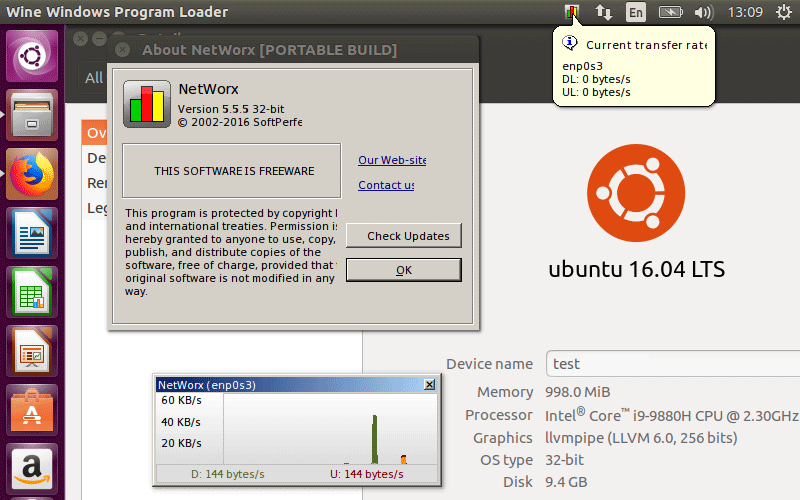
Here is a screen shot of NetWorx v5.5.5 successfully running on Ubuntu 16.04, with the graph working properly:
hi!
I'm trying to run networx on pop_os 22.04 an I'm getting this error message:
invalid floating point operation
Exception EAccessViolation in module networx.exe at ...
To me this looks like memory error. Can you help me with this one?
Thank you very much in advance!
The latest versions seem to have issues when running on Linux under Wine. You are welcome to try the last freeware version, as it's known to work as per the above screen shot.
Hi!
Thanks for quick reply.
Works like a charm. Except I can't monitor my gateway: when I click "monitor my router" it throws exception error. Is there an easy fix for this one?
I am afraid not. That old version of NetWorx relied on Windows UPnP libraries, which are not implemented in Wine. Therefore, regular network adapters can be monitored, but a router cannot be.