Automatically show network graph at boot on Linux
2 posts · Closed
I have used NetWorx for many years under Windows 7. One of the most useful tools in my toolbox.
Now I am moving our Intel-based desktop computers to Linux Mint 19.3. NetWorx does load and appears on the bottom tray, as in Windows.
The difference is that I need to: right-click the tray icon, then cursor over the 'Show Graph' offering, then wait for the network ID (eno1) to appear and left-click it. This needs to be done on each new boot of the system.
There is an argument in the 'networx.desktop' file that reads: Exec=networx. Perhaps this is a location to add a command argument that triggers the 'Show Graph eno1' function.
Do you know if there is any approach that can produce the NetWorx desktop graph automatically at boot, just like it is under Windows?
Norville
That's a good point. We have just added a new small function that lets you have the graph open at startup.
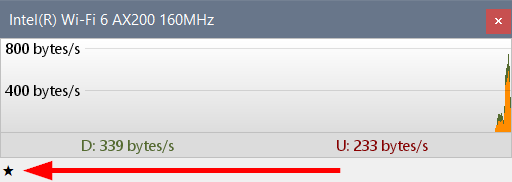
You can download the updated build here. It has a star button in the bottom-left corner of the graph, which toggles between a white star ("not showing on startup") and a black star ("showing on startup").
Below is a screen shot from Windows, but the same button was added in the Linux and macOS versions: