Double bandwidth rate when using Kerio VPN
5 posts · Closed
Hello. I use the last version of NetWorx (6.2.8) on Windows 10 64bit (last release).
When I use Kerio VPN, NetWorx shows me double rate speed. I use "ignore local traffic..." for the application usage monitoring. When I change the "Monitor Interface" to Wi-Fi device, the problem is solved, however, I can't use Usage Monitoring then. How can I fix this problem?
It's likely that the Kerio driver intercepts your network traffic, encrypts it and sends it encrypted, which NetWorx records twice. Once from the actual applications and then once again from Kerio.
One solution would be, as you mentioned, choosing a specific network interface. This will disable per application recording though.
Alternatively, you could try our newer product - NetGenius. It uses a different monitoring mechanism and there is a chance it will work correctly with Kerio.
Thank you for your answer. I've been using NetWorx for a long time. It is lightweight and has a nice interface.
However, I installed and checked NetGenius. It has good features like speed limiting and blocking,... But I feel the value measured by NetWorx is more accurate than NetGenius. I've only downloaded a few files and checked the speed and volume consumed in both applications, and they are not the same.
I know NetGenius is new. I hope it becomes better over time. :-D
See this, please. Not solved yet.
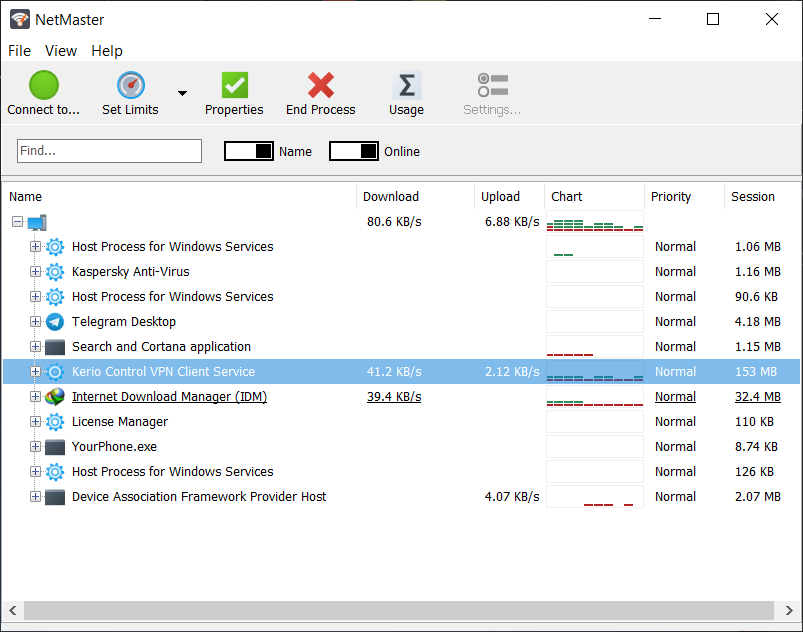
Looks like the same problem here. The Kerio service intercepts your network traffic, encrypts it and sends it encrypted, which NetGenius records twice. Once from the actual applications and then once again from Kerio.
We have added a workaround and it will simply ignore this service. Kindly try installing the latest build and let me know if it helped.