Cannot monitor FRITZ!Box 6591 on second PC
8 posts · Closed
Hi all,
NetWorx has been working fine on my main computer. Now I want to use it on my second PC to monitor my FRITZ!Box 6591, but it doesn't work.
I read all topics here about FritzBox, but nothing helped.
Thanks for help in advance.
Best regards,
Klaus
Unfortunately, there is nothing we can do about a specific router. Basically, in order to be monitored, a router must support SNMP or UPnP and expose the WANCommonInterfaceConfig service. If it does not support either of these, such router simply cannot be monitored.
Please check our Router Monitoring chapter of the user manual and refer to your router's documentation to find out which (if any) technology is supported.
The Fritzbox supports UPNP monitoring.
The problem is, the download/upload numbers are incorrect. I have 1.15 GBit down and 57 MBit upload. Networx shows D 600K and U 2,8K. My Fritzbox shows a download speed of 950 Mbits.
Can you check it? On Fritzbox 7490 and 7530 Networx works correctly, without any problems.
Regards,
Red
It is likely a bug in the UPnP implementation of the router. Unfortunately we don't have this device for testing, but you can try this third-party application called UPnP Gateway Traffic Monitor.
If it works and shows the correct data, we may be able to investigate why NetWorx's reporting is wrong. Otherwise, it sounds like FritzBox 6591 has a buggy UPnP implementation.
I found something. When I use the following script and the command line command, the down/upload current is displayed:
nano linkspeed.xml
Insert this code in the file:
<?xml version="1.0" encoding="utf-8" ?>
    <s:Envelope s:encodingStyle="http://schemas.xmlsoap.org/soap/encoding/" xmlns:s="http://schemas.xmlsoap.org/soap/envelope/">
        <s:Body>
            <u:GetCommonLinkProperties xmlns:u="urn:schemas-upnp-org:service:WANCommonInterfaceConfig:1" />
        </s:Body>
    </s:Envelope>
after that, change the IP of the Fritzbox and run this command:
curl -s "router-ip-address/igdupnp/control/WANCommonIFC1" -H "Content-Type: text/xml; charset="utf-8"" -H "SoapAction:urn:schemas-upnp-org:service:WANCommonInterfaceConfig:1#GetAddonInfos" -d "@linkspeed.xml"
The output when not downloading:
<?xml version="1.0" encoding="utf-8"?>
<s:Envelope xmlns:s="http://schemas.xmlsoap.org/soap/envelope/" s:encodingStyle="http://schemas.xmlsoap.org/soap/encoding/">
<s:Body>
<u:GetAddonInfosResponse xmlns:u="urn:schemas-upnp-org:service:WANCommonInterfaceConfig:1">
<NewByteSendRate>6686</NewByteSendRate>  <--- upload
<NewByteReceiveRate>1414078</NewByteReceiveRate>  <--- download
<NewPacketSendRate>0</NewPacketSendRate>
<NewPacketReceiveRate>0</NewPacketReceiveRate>
<NewTotalBytesSent>819115474</NewTotalBytesSent>
<NewTotalBytesReceived>2080148768</NewTotalBytesReceived>
<NewAutoDisconnectTime>0</NewAutoDisconnectTime>
<NewIdleDisconnectTime>0</NewIdleDisconnectTime>
<NewDNSServer1>83.169.185.161</NewDNSServer1>
<NewDNSServer2>83.169.185.225</NewDNSServer2>
<NewVoipDNSServer1>83.169.185.161</NewVoipDNSServer1>
<NewVoipDNSServer2>83.169.185.225</NewVoipDNSServer2>
<NewUpnpControlEnabled>1</NewUpnpControlEnabled>
<NewRoutedBridgedModeBoth>1</NewRoutedBridgedModeBoth>
<NewX_AVM_DE_TotalBytesSent64>819115474</NewX_AVM_DE_TotalBytesSent64>
<NewX_AVM_DE_TotalBytesReceived64>2080148768</NewX_AVM_DE_TotalBytesReceived64>
<NewX_AVM_DE_WANAccessType>Cable</NewX_AVM_DE_WANAccessType>
</u:GetAddonInfosResponse>
</s:Body>
The output when I download something:
<?xml version="1.0" encoding="utf-8"?>
<s:Envelope xmlns:s="http://schemas.xmlsoap.org/soap/envelope/" s:encodingStyle="http://schemas.xmlsoap.org/soap/encoding/">
<s:Body>
<u:GetAddonInfosResponse xmlns:u="urn:schemas-upnp-org:service:WANCommonInterfaceConfig:1">
<NewByteSendRate>147600</NewByteSendRate>  <--- upload
<NewByteReceiveRate>22996325</NewByteReceiveRate>  <--- download
<NewPacketSendRate>0</NewPacketSendRate>
<NewPacketReceiveRate>0</NewPacketReceiveRate>
<NewTotalBytesSent>819230094</NewTotalBytesSent>
<NewTotalBytesReceived>2080760983</NewTotalBytesReceived>
<NewAutoDisconnectTime>0</NewAutoDisconnectTime>
<NewIdleDisconnectTime>0</NewIdleDisconnectTime>
<NewDNSServer1>83.169.185.161</NewDNSServer1>
<NewDNSServer2>83.169.185.225</NewDNSServer2>
<NewVoipDNSServer1>83.169.185.161</NewVoipDNSServer1>
<NewVoipDNSServer2>83.169.185.225</NewVoipDNSServer2>
<NewUpnpControlEnabled>1</NewUpnpControlEnabled>
<NewRoutedBridgedModeBoth>1</NewRoutedBridgedModeBoth>
<NewX_AVM_DE_TotalBytesSent64>819230094</NewX_AVM_DE_TotalBytesSent64>
<NewX_AVM_DE_TotalBytesReceived64>2080760983</NewX_AVM_DE_TotalBytesReceived64>
<NewX_AVM_DE_WANAccessType>Cable</NewX_AVM_DE_WANAccessType>
</u:GetAddonInfosResponse>
</s:Body>
Without downloading:
<NewByteSendRate>6686</NewByteSendRate> <--- upload
<NewByteReceiveRate>1414078</NewByteReceiveRate> <--- download
With downloading:
<NewByteSendRate>147600</NewByteSendRate> <--- upload
<NewByteReceiveRate>22996325</NewByteReceiveRate> <--- download
Perhaps this information helps?
Thank you.
That's pretty much what NetWorx does, except we use NewTotalBytesSent and NewTotalBytesReceived. It would be interesting to see if these are incremented correctly.
You can use Wireshark or a tool like SmartSniff to see what values come from the router to NetWorx. The responses are XML and human-readable, same as in your tests:
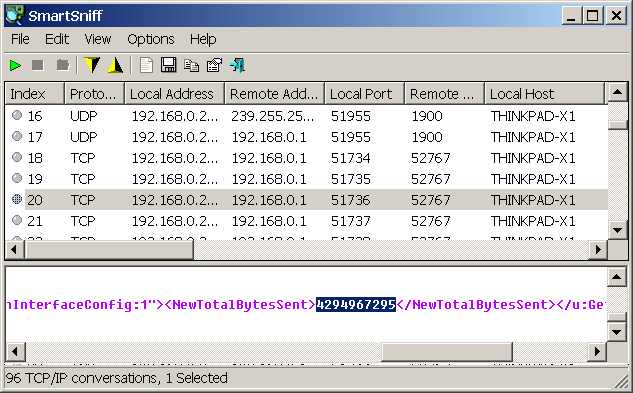
I suggest to save the XML before running a download. Then download a file of the known size (say 10 MB) and save the XML again. After that, please check by how much NewTotalBytesReceived has advanced. I am guessing it may be not correct.
Hello,
I think I found the problem.
Networx is requesting <NewTotalBytesSent>1427834786</NewTotalBytesSent> and <NewTotalBytesReceived>3349522615</NewTotalBytesReceived>
but needs to request <NewByteSendRate>6686</NewByteSendRate> and <NewByteReceiveRate>1414078</NewByteReceiveRate>.
These two values go up and down, depending on the workload.
NewByteSendRate and NewByteReceiveRate cannot be used to calculate the usage. For example, if we know that one second the rate was 10KB/s and the next second the rate was 15KB/s, we can't calculate how much data was transferred between these points in time. This would make all the usage reports unusable.
Whereas if we use NewTotalBytesSent and NewTotalBytesReceived (provided the router responds with accurate details) we can calculate both. That is what NetWorx does. Say, if one second the total was 10KB and the next second the total was 15KB, we know that we need to add 5KB to the usage records and the rate was 5KB/s.