Automatically save speed meter results to .csv
5 posts · Closed
I'm running the speed meter scheduler. Is there a way of automatically saving the results in a .csv file after every test, rather than having to go into Networx - Speed Meter and clicking the save icon every time I want to see the results?
It sort of depends on how frequently and where you need that CSV file. Speed test results are saved to an SQLite database, so you can extract them periodically or on demand.
Download the SQLite command line tools and extract sqlite3.exe. Then in a command prompt execute something like this:
sqlite3 -csv -header "%PROGRAMDATA%\SoftPerfect\NetWorx\NetWorx.db" "SELECT * FROM SPEEDTEST ORDER BY TIMESTAMP" > somefile.csv
This will open the database file, select all records from the SPEEDTEST table and save them to somefile.csv comma-separated.
Thanks Andrew - that's really helpful - just the information I needed.
Executing that command from the command prompt worked perfectly and I have a .csv file just as I wanted.
But as soon as I put that command in a batch (.bat) file I get the dreaded "Access denied" error. I've had this sort of problem many times in the past and usually managed to sort it out. But not this time. Running the batch file as administrator doesn't work and all the file and folder permissions look okay. But I've never used sqlite3.exe before so I'm wondering whether it doesn't like being used from a batch file for some reason? Although it's fine directly from the command prompt. Any ideas?
There isn't anything special about sqlite3.exe, it's just a regular console program. I have tried this in a batch file and it worked as expected.
How exactly do you run it?
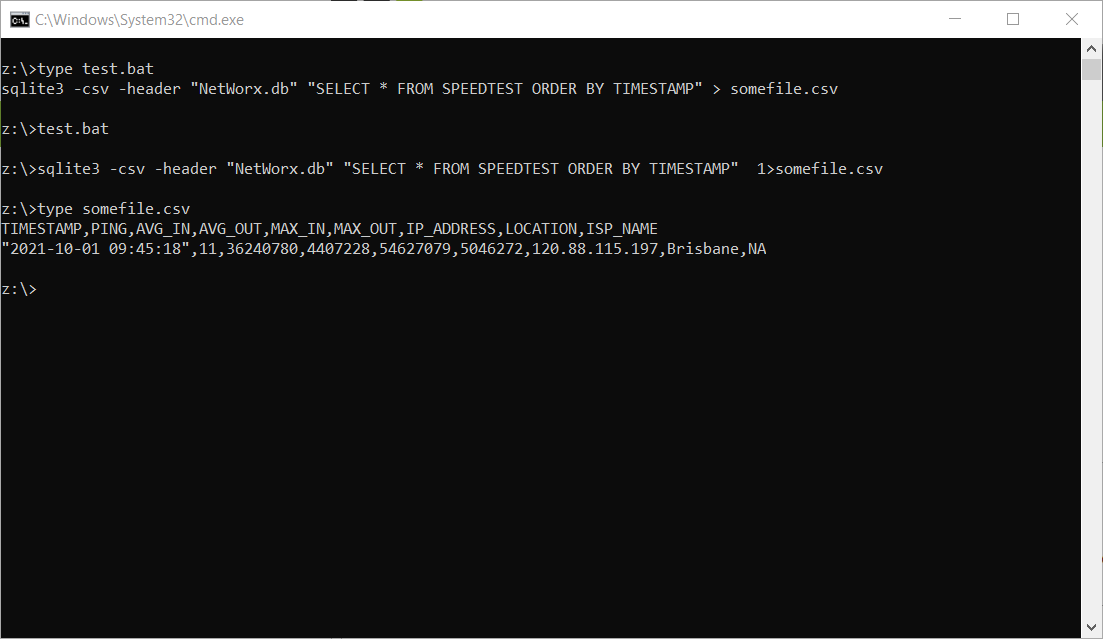
Thanks for that Andrew. I've sorted it out. I was trying to run the batch file by double clicking it and I seem to remember from long ago that can introduce problems for some reason. But there's no difficulty running it from the command prompt or a VBA shell command. Thanks for your help.