Feature requests: comma-separated port list, and quick telnet/ssh to a switch
3 posts · Closed
Hello,
I have two feature requests. Not a huge deal, just quality of life stuff.
First:
I frequently have to run commands (enable port authentication) against a list of ports on our switches depending on the results of your Switch Port Mapper scan. Right now I highlight every applicable port and copy the Port ID, then paste into a notepad and comma separate them myself. If you could create a feature to copy a list of ports comma-separated, you'd save me a step and I'd appreciate it.
For instance:
1,2,3
instead of:
1
2
3
Second:
If you could add a button to quickly telnet/ssh into a switch(s) that I'm running a scan against (maybe on the confirmation box that pops up before the scan runs?), that would save me having to open putty manually or through right-click in Network Scanner.
Your Switch Port Mapper and Network Scanner are staples of my team's day-to-day toolset, we appreciate it!
Thanks!
Hi Scott, thank you for the feedback!
Regarding comma-separated values
It is indeed a good point that sometimes one may need the values comma-separated rather than new-line separated. We have just added a way to do that.
Download the new builds (installer, portable), hold Shift when copying column values. With Shift down, the result will be comma-separated. With Shift up, the result will be newline separated, same as before.
Regarding SSH connection to the selected switch
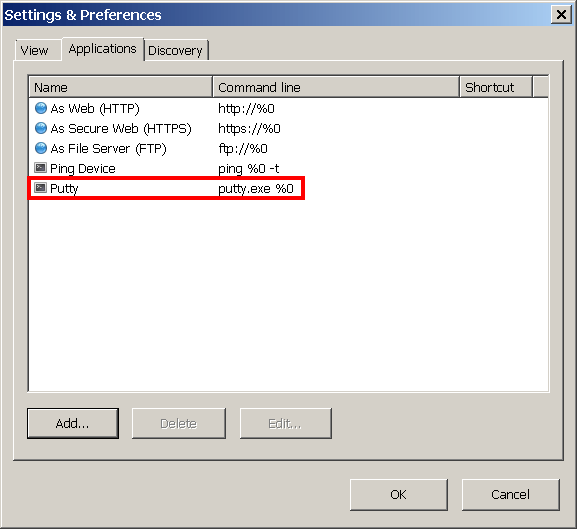
There is a way to quickly open a switch in Putty, a web-browser or any other external application. Go to File - Settings - Applications and add Putty as an external application like this:
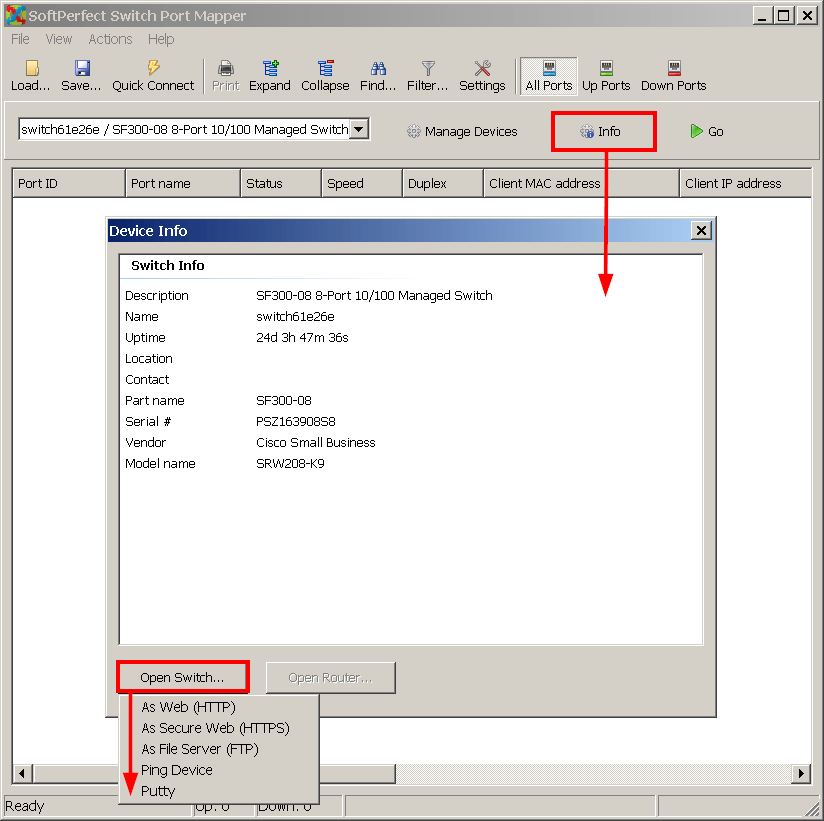
Now, when the required switch is selected, click Info and then Open Switch as shown below. The app added in the previous step will be there:
Great work as always, thanks!