Scanning multiple VLANs or different IP ranges
2 posts · Closed
Jeff Guest
One more question... when I scan a switch, a box pops up for me to pick the IP range to scan. I understand this is scanning against the MAC address table and pairing MAC addresses with IP addresses.
In our environment, we have many VLANs. One VLAN might be 172.19.44.xx and another VLAN might be 192.168.68.xx - two completely different network address ranges. It looks like the pop-up scanner will only let me pick one network at a time.
Is there a way to create a "group" of networks? Or perhaps once the scan is completed, can I tell it to rescan with a different IP range?
Ann SoftPerfect
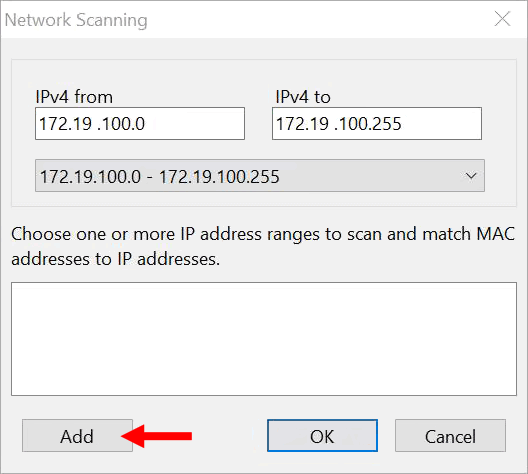
There is a way to add and scan several IP ranges at once. Simply click the Add button in the bottom-left corner of the scan dialog:
This topic is closed.
It has had no new posts for over a year, so the software versions it talks about may be out of date.
Start a new topic in Switch Port Mapper if you have a similar question.