Google Chrome missing from list on Windows 11
5 posts · Closed
Hello!
I am missing the Google Chrome item in my instance of Cache Relocator on Windows 11, therefore I can't relocate the Chrome temp folder (see attachment).
How can I fix this?
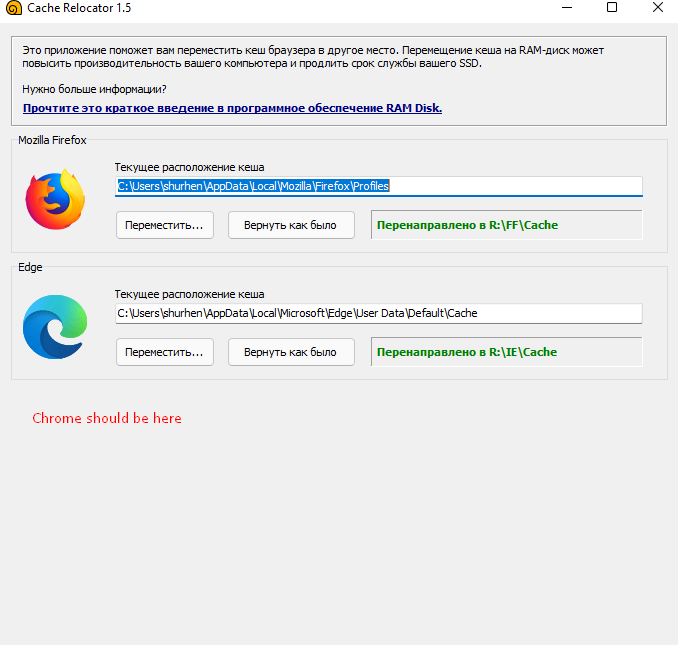
+ feat.req. - manual option to choose your portable browser's cache directory, now I see app searches only installed browsers
It sounds like you are using a portable version of Chrome. It is not supported as there is no official portable version from Google.
Assuming you are using portable Chrome from PortableApps.com, unlike the installed Chrome it doesn't use the profile folder for the cache. Instead the cache is temporarily created in %TEMP% when you start it and is deleted when you close it. So there is nothing to redirect really.
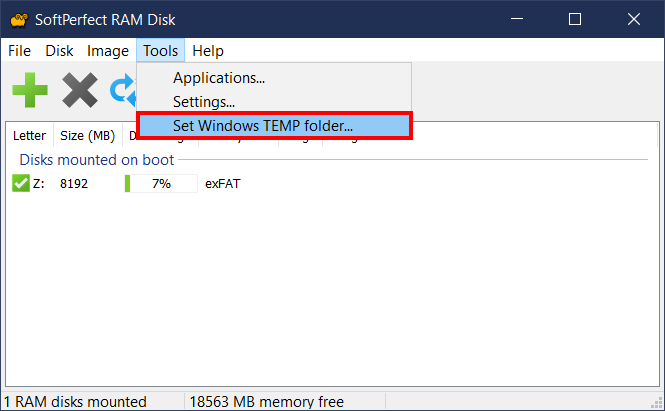
You may want to point the %TMP% and %TEMP% environment variables to a RAM disk, so the portable Chrome cache will be created there too. In our RAM Disk there is a special function to redirect Windows temporary folders as shown below, although this can be done manually too.
Thanx for the hint.
1. It's ultraeasy to make Chrome portable by hand.
2. We will still benefit of moving PROFILE\CRASHPAD , GRSHADERCACHE, SHADERCACHE and DEFAULT\GPUCACHE, and possibly SERVICE WORKER folders to RAMdisk.
Thanx for answer. Google Chrome was installed using chocolatey. Maybe that's why.