Malwarebytes gets stuck at startup
2 posts · Closed
Gustave69 Guest
Hello,
I'm using SoftPerfect RAM Disk 4.3.1 on Windows 11. TEMP & TMP are on RAM disk Z: (NTFS).
With this configuration, when my PC starts, my antivirus Malwarebytes 4 (last version) gets stuck in starting.
When I disable RAM Disk and restart PC, Malwarebytes starts like a charm. Is there a conflict between these? Can you help me please?
Thanks a lot
Andrew SoftPerfect
Sorry this doesn't seem reproducible. In our test Malwarebytes worked well with TEMP/TMP set to either Z: or Z:\Temp where Z is an NTFS-formatted RAM disk.
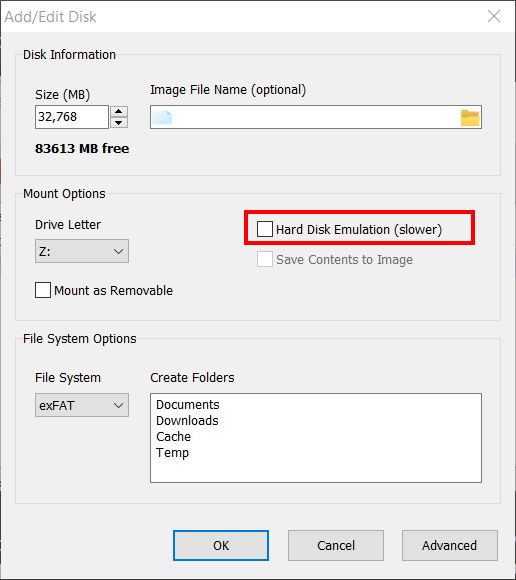
But if it does not work for you, try ticking the Hard Disk Emulation option in the RAM disk properties. Some programs don't like it when temporary files reside on a standalone volume, so this setting usually makes them happy.
This topic is closed.
It has had no new posts for over a year, so the software versions it talks about may be out of date.
Start a new topic in RAM Disk if you have a similar question.