Error cloning virtual machine to RAM drive
2 posts · Closed
Running workstation 15.5 on Win 10, I have created a virtual Win 10 machine on my physical hard drive and created a RAM drive using ImDisk of 22GB (I have 32GB of RAM). It creates fine, the host computer detects it and it works ok; however, when I try and create a full clone of my virtual Win 10 machine on the RAM drive, VMware gives me the following error: "An error occurred while cloning: One of the parameters supplied is invalid."
I follow exactly the same process on another physical drive and there are no problems at all; it fully clones and works well.
Any ideas welcome.
I am afraid we can't help with ImDisk, it's not our product.
However, if a similar issue happens with our RAM Disk, it's probably because VMware uses Volume Shadow Copy (VSS), which doesn't work on standalone volumes. I recommend one of these options as a workaround:
- Shutdown the VM and copy it to the RAM disk using regular file copy; or
- In the RAM disk properties tick the Hard Disk Emulation option and remount the disk.
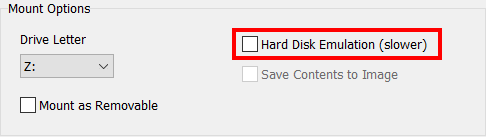
The latter is slightly slower in terms of performance, but with the HDD emulation the RAM disk will be indistinguishable from a physical drive.