Files still being written to C:\WINDOWS\TEMP after migration
4 posts · Closed
After testing RAM Disk software exclusively to migrate all contents of our hard disk C:\WINDOWS\TEMP to RAM disk R:\TEMP as recommended in your manuals, we are still not convinced, since apparently there are still quite a number of files being written in the former and therefore making it useless. Are we missing anything?
RAM Disk is far from being "useless". What you see in your C:\Windows\TEMP depends on how you performed your migration.
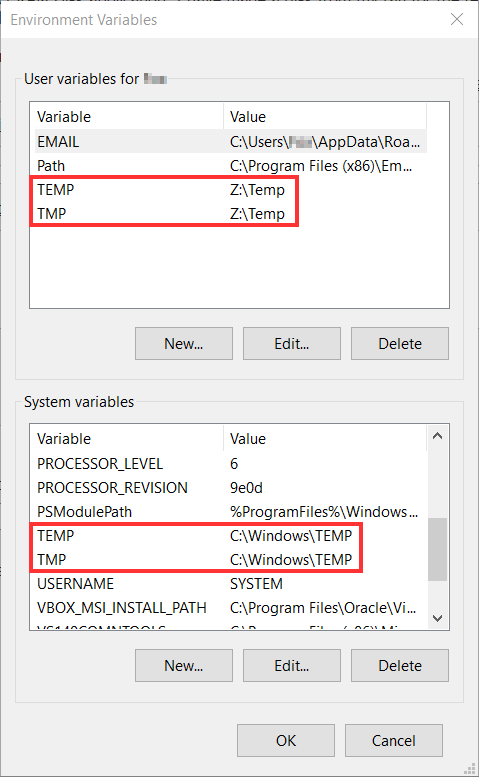
There are two kinds of TMP/TEMP environment variables in Windows: user-level (used by the regular applications that you launch) and system-level (used by the system and services).
When you change the TMP/TEMP variables in RAM Disk settings, it only modifies the user-level variables. This is done for safety, because the system-level temporary folders are crucial for normal Windows operation. If system-level variables point to a RAM disk and for some reason the disk becomes unavailable, the system may fail or refuse to boot.
If the user is determined to move everything to a RAM disk, it is possible to redirect the system-level TMP/TEMP to a RAM disk manually. In most cases is works fine, however you must be aware and accept the risk probability of breaking your system.
If you want to override or inspect your environment variables, press Win + R (Run), type sysdm.cpl, then go to Advanced - Environment Variables.
Many thanks!
Two more questions:
1. How do I implement the migration of system-level TMP/TEMP to the RAM?
2. What do I do if the system eventually breaks?
1. To change the system-level TEMP and TMP, press Win + R (Run), type sysdm.cpl, press Enter. The System Properties window will open. There, go to Advanced tab, press Environment Variables..., and then under System Variables section press Edit...
2. If your system breaks, a safe mode boot may help. Or you can try booting into the recovery mode and changing HKEY_LOCAL_MACHINE\System\CurrentControlSet\Control\Session Manager\Environment back to the standard locations.
However, we do not support this, and you should keep in mind that you are doing it at your own risk.