Used space reported incorrectly on Windows 11
5 posts · Closed
When Windows 11 is using the RAM disk for an extended period of time (21 days in the screenshot), the RAM disk starts reporting used space that isn't linked to any files. In the picture you see that the only folder on the drive reports a "Size on disk" of 2.12 GB while the RAM disk reports 12.3 GB of used space.
When the RAM Disk application starts, this is not the case. Rather, it is slowly getting worse over time.
I discovered the reason. It's because of the "Allow files on this drive to have contents indexed in addition to file properties" setting on the RAM disk.
Is there any way to disable this by default when the RAM disk gets created?
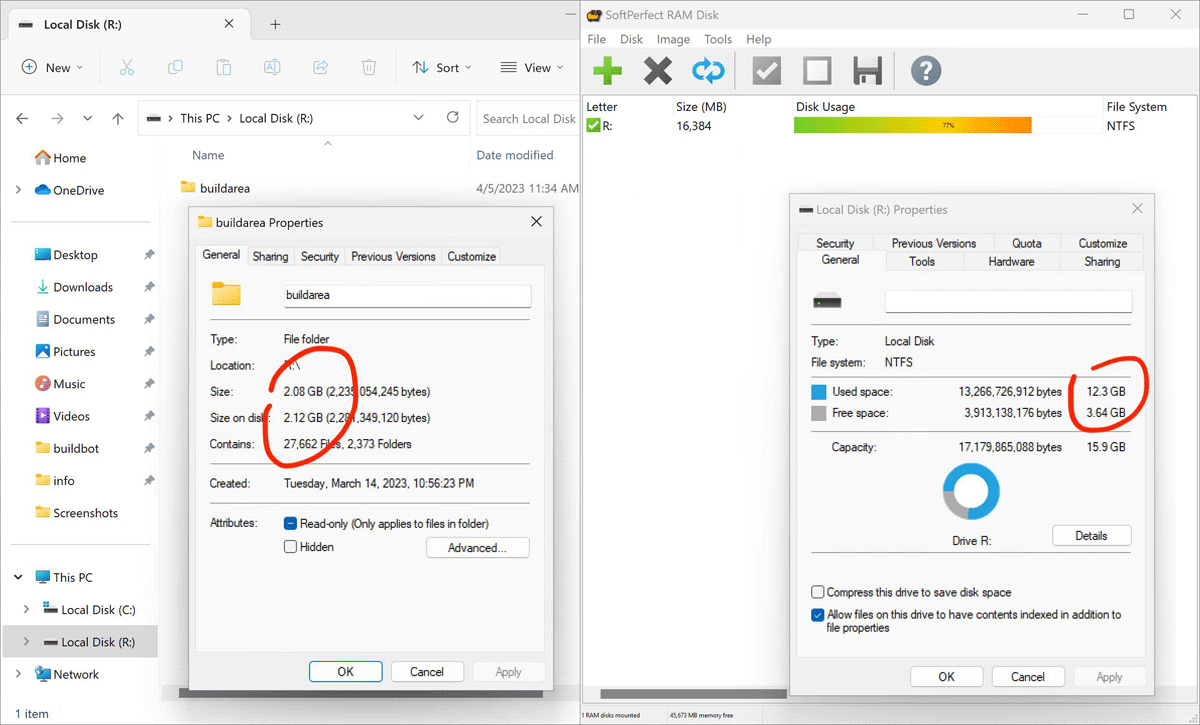
I believe the indexing should be off by default, at least the setting that enables indexing contents is off when we create a new RAM disk on our test system.
If for some reason it's on by default on your system, I would suggest using exFAT instead. Generally, NTFS is more advanced as it supports file compression, symbolic links, quotas and transacted operations. On the other hand, exFAT is more lightweight, and since it doesn't have the NTFS overhead, it has 10-20% better performance with RAM disks.
If you don't use the above-mentioned features with your RAM disk, then exFAT would be a better choice, solving the issue with indexing and offering better performance.
Thanks for the suggestion. I cannot use exFAT as the use case here is running Windows unit tests for the Python programming language. There are some tests specific to NTFS that we want to run.
Maybe what's happening here is that Windows 11 now defaults to allowing indexing? There is a PowerShell way to disable indexing on a drive explicitly. Maybe you could put this as an explicit option in the configuration of a RAM disk and execute this WinAPI call on mount?
Thanks, we'll have a look at what can be done and post an update here.
Thank you for your patience. We found the bug that was causing contents indexing to re-enable after rebooting, despite being disabled when manually mounting a RAM disk.
We've fixed this in our latest build, ensuring contents indexing stays disabled for all NTFS volumes.