Administrative share not working for RAM disk
6 posts · Closed
Hello.
I have two different machines both with Windows 10 Pro. Both machines also have boot-time disks.
One of them has the administrative share of the disks, while the other doesn't. Why? Is there some configuration parameter that I forgot?
For example:
------
Machine A, name "ariel".
Disk C: (traditional disk of Windows)
Disk D: (disk mounted by RAMDISK)
If I access from network \ariel\C$ it works fine.
If I access from network \ariel\D$ it also works fine.
------
Machine B, name "gabriel".
Disk C: (traditional disk of Windows)
Disk D: (disk mounted by RAMDISK)
If I access from network \gabriel\C$ it works fine.
But if I access from network \gabriel\D$ it doesn't work. Why?
------
What I've tried:
Firewall.
File Sharing.
LocalAccountTokenFilterPolicy Registry Key.
Thank you,
André Poffo
It's hard to say outright. Are the configured RAM disks identical on both of these machines?
More importantly, what does net share print when launched from a command prompt on the problematic server? Also what error message are you getting when you try to access it?
Well. It's simples to reproduce this error. It occurs in both versions 3.4 and 4.0.
Install ramdisk on Windows 10.
Create an ramdisk with any amount of space.
Restart windows.
After logon, go to Computer Management->Shared Folders->Shares. (See attachment)
You will see that new ramdisk doesn't appears here. With older windows versions it's ok.
Thanks,
André Poffo.
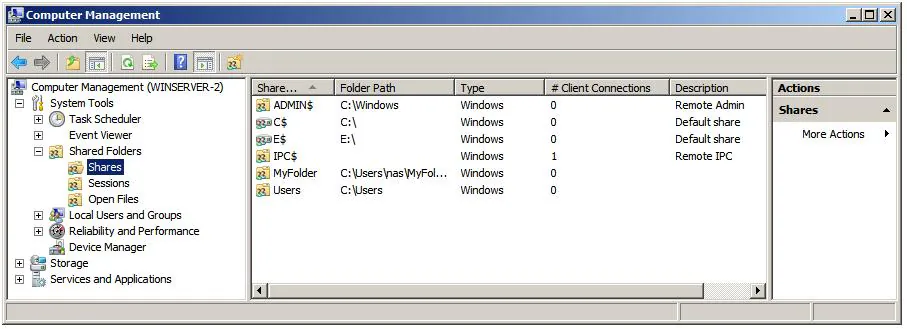
Thank you for the description André. I did as you suggested and was able to see the problem after a reboot. It looks like Windows doesn't want to treat a standalone RAM disk as an administrative share.
There is an easy workaround though, just tick Hard Disk Emulation in your RAM disk's properties. This way the app will emulate a complete HDD with partitions, which Windows treats as an administrative share upon boot.
I already tried this. Did not solved.
Today I have one fake disc, with 512mb and Hard Disk Emulation marked. It only serves for the purpose to "create administrative shares".
When windows get started there is none of the discs shared (only HDD C$). What I have to do is open RamDisk and REMOUNT this 512mb disk (with hard disk emulation). Than it creates the others administrative shares. Everyday, after a reboot I have to do this. Only in Windows 10.
I think it may be a bug with the APIs.
Thanks for everything.
Sorry I am afraid I don't have any other ideas - on our test machine it's correctly created every time, like on your working machine.
I guess you can try executing the net share command as a workaround to create the share manually on startup, but that's a bit of a hack.