Driver version does not update automatically
6 posts · Closed
I had the driver version 4.4.0.0 from 19.04.2023 installed. I installed SoftPerfect RAM Disk 4.4.2, but the driver version remained the same.
If I uninstall SoftPerfect RAM Disk, restart the computer, and install SoftPerfect RAM Disk 4.4.2 again, the driver is updated to version 4.4.2.0 from 05.11.2024.
It may require one or two reboots for the drivers to be replaced. This is because Windows locks the driver files early in the boot process, and up to two reboots might be necessary to successfully replace or update them.
I installed SoftPerfect RAM Disk 4.3.3 on a Windows 11 virtual machine, upgraded to SoftPerfect RAM Disk 4.4.2, rebooted the machine 5 times.
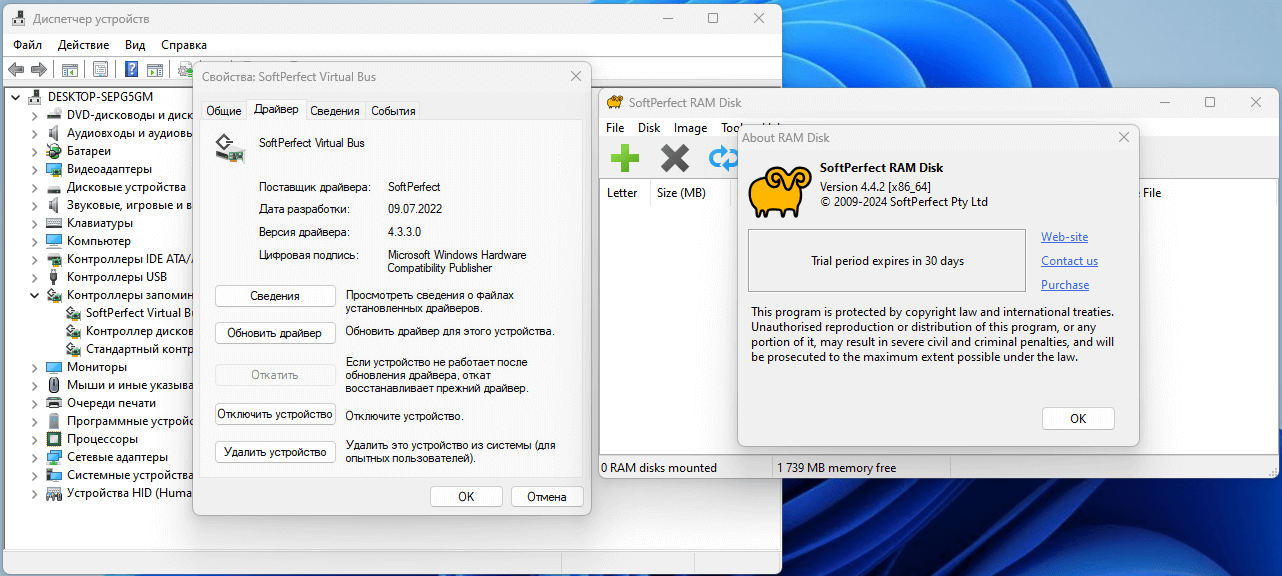
Same here:
RamDisk 4.4.2, latest version, Windows 11
Driver version: 4.3.3.0 of 9 July 2022
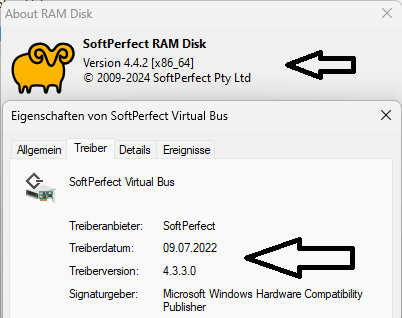
The drivers have actually been updated to the newest version. However, the corresponding INF file in the Windows\INF folder has not been updated, causing the Device Manager to display the wrong version.
You can check the actual driver files and their versions directly:
- %SYSTEMROOT%\System32\drivers\spvve.sys
- %SYSTEMROOT%\System32\drivers\spvdbus.sys
We will review the installation procedure to determine if the INF files can be updated as well.
You're right, Andrew, both drivers (spvve.sys and spvdbus.sys) have been updated to the latest version. Would be great if it were possible to update the INF files as well. Thanks for your support.