Count amount of data written to the RAM disk
12 posts · Closed
Hi,
I'm testing SoftPerfect RAM Disk version 4.4.3 and would like to be able to count the amount of data written to the RAM disk. Is there a way to enable a log of the megabytes written daily to the RAM disk?
Thank you.
At the moment, there is no feature that specifically tracks the amount of data written daily to a RAM disk. Could you perhaps elaborate on the practical use case for this?
It might be better to implement a display of total I/O statistics across all configured RAM disks, perhaps in the About dialog, for curious users to see how much writing their SSD has been spared.
Hello and thank you for your response.
I'm interested in understanding how much data some applications write to the hard disk, redirecting the data writing to the RAM disk.
I have Firefox profiles on RAMdisk, cache in RAM (not RAMdisk). It seems that Crystal Disk Info still includes the RAMdisk in total host writes (I don't have hard disk emulation turned on and autosave turned off, measured before shutting down) unless it's a bug.
username wrote:
I have Firefox profiles on RAMdisk ...
Hi, I have your exact configuration (Firefox profiles on RAMdisk, cache in RAM (not RAMdisk), hard disk emulation not active and autosave turned on), but CrystalDiskInfo has never seen the RAM Disk...
gldisk wrote:
but CrystalDiskInfo has never seen the RAM Disk...
You mean it does not count Firefox in the total host writes in gigabytes? I wonder why it happens to me :-(
I believe I can address both questions here:
1. CrystalDiskInfo does not detect RAM disks because they are virtual devices. These disks lack physical attributes such as serial numbers and power-on counters, and they do not support S.M.A.R.T. monitoring.
2. If you redirected your Firefox profile using a symbolic link or an NTFS junction point, most monitoring tools (including Windows Task Manager) will report I/O activity as occurring on the drive containing the link, not on the actual target drive.
We're about to finalise a minor update to the RAM disk app that will enable real-time visibility of RAM I/O activity.
username wrote:
You mean it does not count Firefox in the total host writes in gigabytes? I wonder why it happens to me
No, I mean that the RAMdisk is not really seen by Crystal Disk Info for the reasons explained by Andrew just above.
Andrew wrote:
2. If you redirected your Firefox profile using a symbolic link or an NTFS junction point, most monitoring tools (including Windows Task Manager) will report I/O activity as occurring on the drive containing the link, not on the actual target drive.
I have reallocated the Firefox profile using the options available in the Firefox configuration itself, so I do not make use of symbolic link or an NTFS junction point in the Windows filesystem.
Andrew wrote:
We're about to finalise a minor update to the RAM disk app that will enable real-time visibility of RAM I/O activity.
Will it be possible to count megabytes as well ?
Andrew wrote:
We're about to finalise a minor update to the RAM disk app that will enable real-time visibility of RAM I/O activity.
This is great, thank you
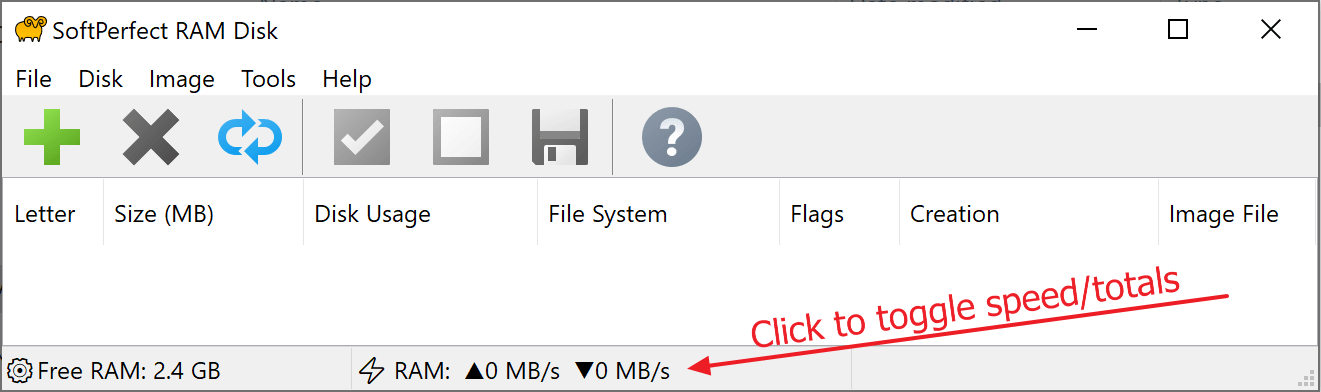
Here is the new build, which displays the current I/O speed and session totals. You can click the I/O speed numbers or the total numbers at the bottom of the RAM Disk app window to toggle between them.
Note: You may need to reboot twice for the new feature to function correctly, due to the driver update procedure.
Great! I will do some testing asap