No feature to save RAM disk data to image on sleep
7 posts · Closed
Why is there no feature to save the RAM disk data to an image file on the disk when the computer enters sleep mode?
Normally, saving to an image file during sleep isn't necessary, as sleep mode doesn't shut the system down. The RAM disk and all its contents remain intact and available when the computer wakes up.
Is there a specific reason or scenario where you'd need the disk to be saved during sleep? It's something we could potentially consider implementing.
If you have a laptop with a battery or a desktop computer connected to a UPS, then saving the RAM disk before sleep is usually unnecessary - power is still maintained.
However, if your computer without a UPS goes into sleep mode and then the power goes out (for example, at night), all data in the RAM disk will be lost. In this case, saving the RAM disk before sleep is essential to avoid losing any changes made prior to sleep.
If you have a laptop without a battery, no UPS, and an environment where power interruptions are a frequent occurrence, then the loss of RAM disk contents (as well as all other unsaved data on the computer) may be an equal issue during both sleep time and waking time.
In this case, you may like to enable the "Save contents every (minutes)" option for your image file. This will mitigate the potential loss of data in the event of power loss. This option is available via right-clicking your RAM disk in the main application window, selecting Properties, and then pressing the Advanced button.
Let's imagine a situation where the RAM disk is saved to an image every 10 minutes.
I add some files to the RAM disk, and 5 minutes later, I put the computer into sleep mode, forgetting to manually save the RAM disk to an image.
Then a power failure occurs, and the data is lost.
But if the RAM disk had been saved right before entering sleep mode, this would NOT have happened!
Of course in that particular situation, if a power failure occurred immediately after putting your laptop to seep, saving the contents of the RAM disk upon entering sleep mode would preserve the last 5 minutes of data changes. However, what we are trying to emphasise here is that if such power outage occurs in your no-battery no-UPS laptop when it is not asleep, the feature you request will not help with preserving the data. That's why we suggest using the automatic periodical saving. At least in such case only maximum of the set number of minutes of data changes would be lost.
That being said, we will look into whether the on-sleep saving can be implemented easily and will post an update here shortly.
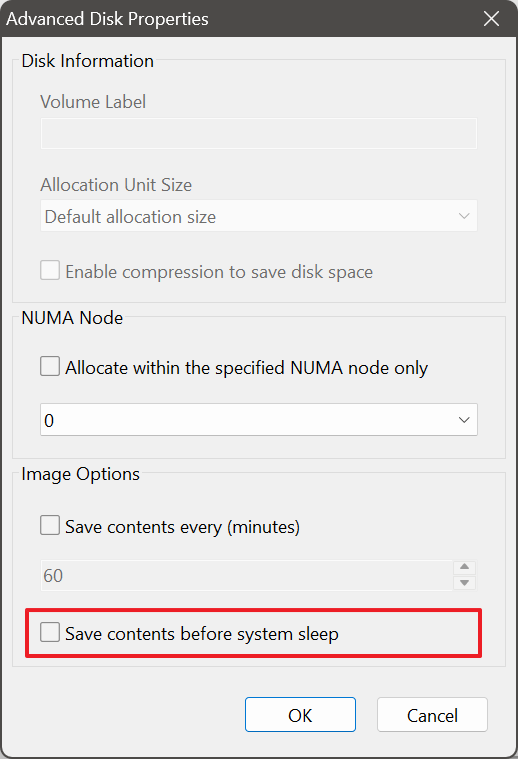
We’ve added the ability to save RAM disk contents to an image file in the latest version of our RAM Disk application. This new option is located under Advanced Disk Properties, as shown in the screenshot below:
Due to Windows system limitations, this feature is only available for:
- RAM disks created at logon, or
- RAM disks created at startup/boot with Hard Disk Emulation enabled.
It is not available for boot-time disks without Hard Disk Emulation.