Format for best performance: RAW or NTFS?
6 posts · Closed
What format can you suggest for RAM Disk for maximum performance in Windows 10 64-bit? RAW or NTFS?
RAW essentially means no file system. You will not be able to write anything to it until it's formatted (unless you have special software that works with unformatted volumes directly).
I'd say go for NTFS, or FAT32 if your files are under 4 GB.
Here is a very good and detailed explanation of differences, advantages and disadvantages of NTFS, FAT16 and FAT32.
That's pretty much correct. I just wanted to add that we've implemented exFAT support in the latest version, which basically brings the best of both worlds:
- Better performance due to the lack of journalling and optimised file system organisation; and
- Very high limits on the number of files and their size, more than sufficient for modern usage.
So you are saying that exFAT will work better (faster) than NTFS?
I'm also using it for internet (chrome / firefox) cache, saving once in 2 hours.
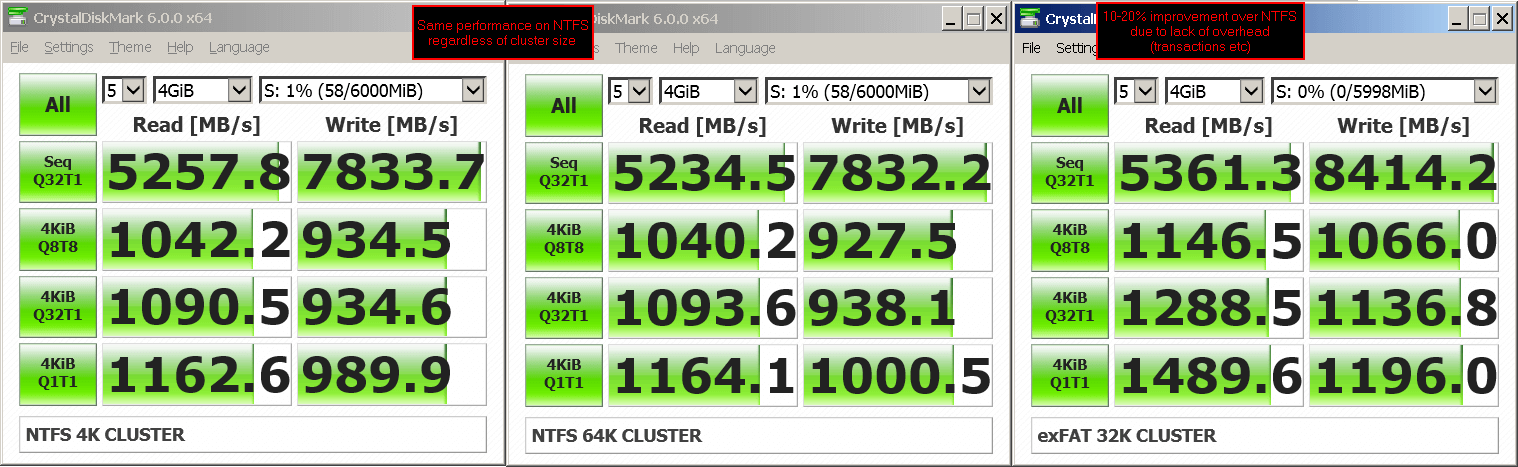
Yes, generally exFAT performs about 10-20% better (faster) than NTFS on a RAM disk.
See the attached screenshot for a test output.