Creating a large RAM disk with a small image file
2 posts · Closed
Evaluating RAM disk. I am struggling with implementing my intentions:
- Create a large 24GB RAM disk (I have 48GB that Windows 10 never seems to use)
- Save the disk image purely for the purpose of capturing a drive icon, volume label, and a variety of temporary folders by name alone (no need to capture any other content on power off)
Thus, I want a large RAM disk, but only want to save a small image file.
So far, I can create and save a small image file, but then I cannot create a RAM disk that exceeds that size. Which is exactly what I want to do. I do not want to create a 24GB image file that will never be used in any way other than to hold a little data. If this can be done, what am I missing?
It indeed doesn't make sense to use a 24 GB image for a small amount of data. However, for your goals, you don't need to use an image at all:
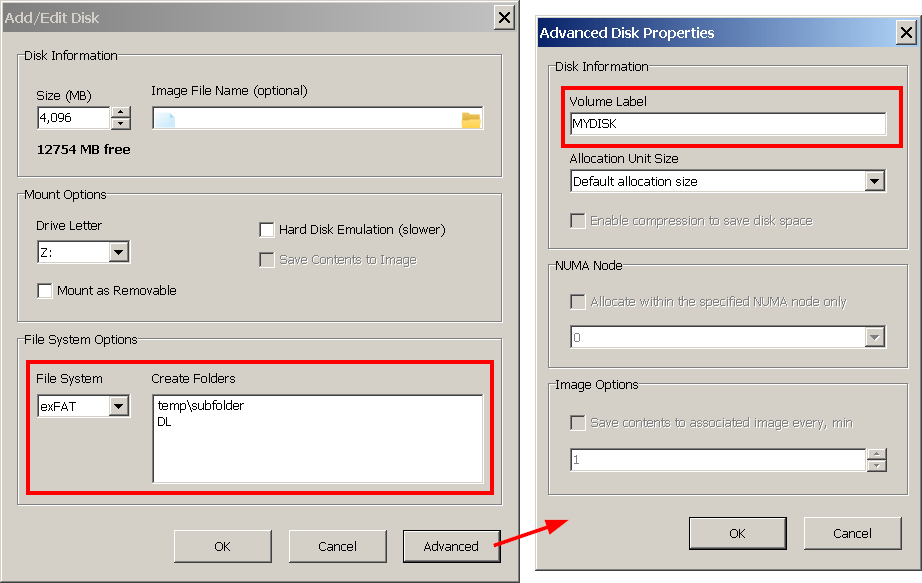
To have a set of predefined folders and a volume label, simply specify those in your RAM disk's properties as shown below. You can specify any number of folders that can also be nested. As the file system we recommend exFAT or NTFS, the former is a bit faster than the latter.
A drive icon is a little more tricky:
- Launch the registry editor regedit.exe
- Navigate to HKEY_LOCAL_MACHINE\SOFTWARE\Microsoft\Windows\CurrentVersion\Explorer\DriveIcons
- Create a key with the RAM disk drive letter, e.g. R
- Under the newly created key create another key named DefaultIcon
- Under the DefaultIcon set the (Default) parameter to the path to an icon.
If you need more details, please see this article - Option 2: Change an Individual Drive Icon by Editing the Registry.