Saving RAM Disk image on RAID0 with 4k sectors
6 posts · Closed
I'm facing a problem with saving a RAM Disk image on a RAID0 (software RAID on Windows Server 2012R2) built on 2 disks with a 4k sector size. Are disks with 4k sectors supported?
Sector size shouldn't really make a difference. Could you perhaps provide more details as to what error you are getting? A screenshot of the Disk Management utility would also be helpful.
We created to dynamic disks and bundled them to a stripeset volume.
When I'm creating an image on that volume:
---------------------------
SoftPerfect RAM Disk
---------------------------
Creation of image file failed

1 Unzulässige Funktion
---------------------------
OK
---------------------------
here comes the screenshot of the disk management
[image: http://flipping.irs-nbg.de/diskmgmt.jpg]
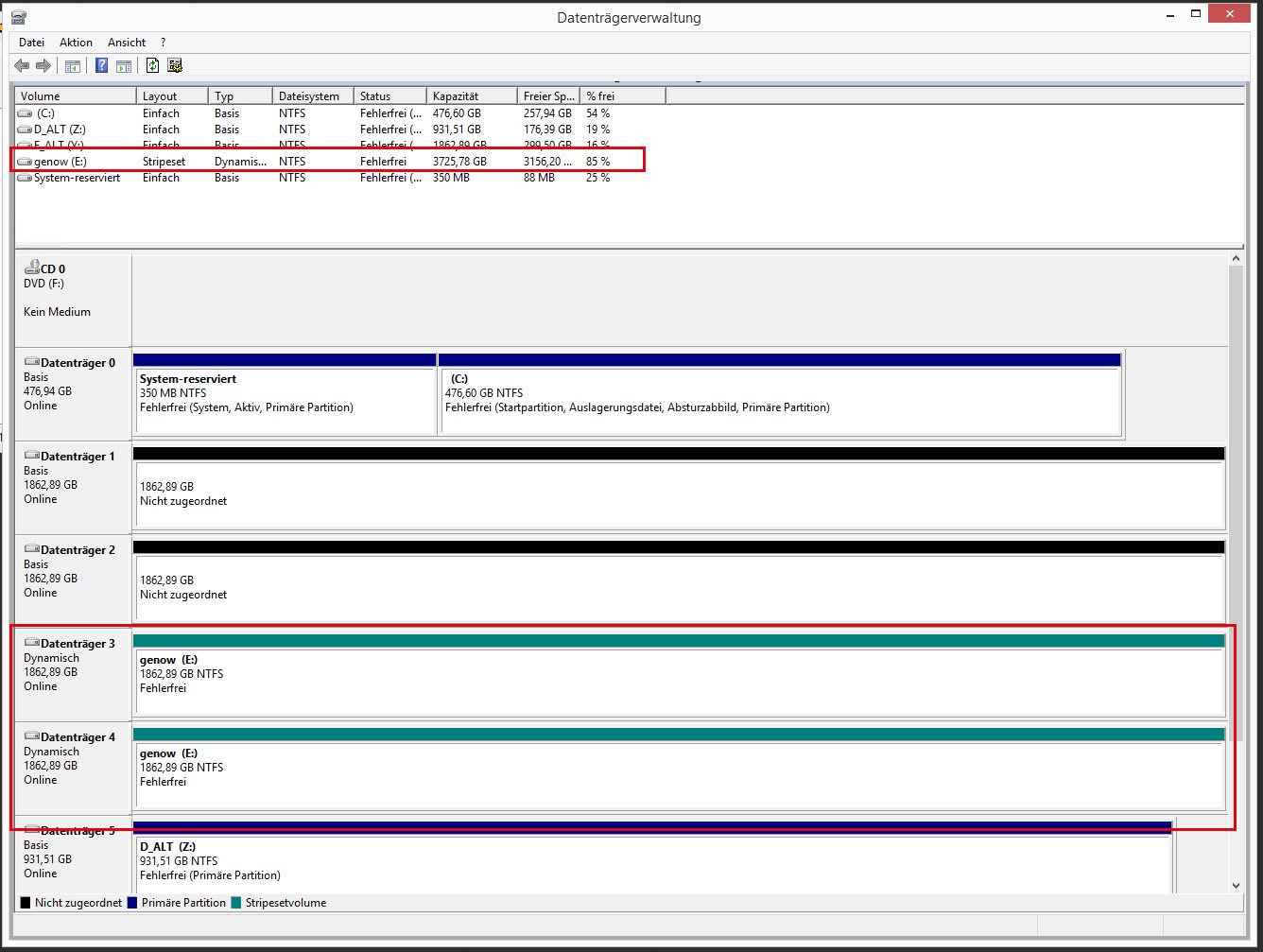
there is no difference, if I use the new way with storage pools and virtual disks
Usage                             : Other
NameFormat                        :
OperationalStatus                 : OK
HealthStatus                      : Healthy
ProvisioningType                  : Fixed
ParityLayout                      : Unknown
Access                            : Read/Write
UniqueIdFormat                    : Vendor Specific
DetachedReason                    : None
WriteCacheSize                    : 0
ObjectId                          : {1}\\W2012R2-IRS-1\root/Microsoft/Windows/Storage/Providers_v2\SPACES_VirtualDisk.ObjectId="{da7cb809-172d-11e4-80b4-806e6f6e6963}:VD:{29939800-1847-11e7-80fb-10c37b44f70f}{29939858-1847-11e7-80fb-10c37b44f70f}"
PassThroughClass                  :
PassThroughIds                    :
PassThroughNamespace              :
PassThroughServer                 :
UniqueId                          : 589893294718E71180FB10C37B44F70F
AllocatedSize                     : 3998614552576
FootprintOnPool                   : 3998614552576
FriendlyName                      : v1
Interleave                        : 262144
IsDeduplicationEnabled            : False
IsEnclosureAware                  : False
IsManualAttach                    : False
IsSnapshot                        : False
LogicalSectorSize                 : 4096
Name                              :
NumberOfAvailableCopies           :
NumberOfColumns                   : 2
NumberOfDataCopies                : 1
OtherOperationalStatusDescription :
OtherUsageDescription             :
PhysicalDiskRedundancy            : 0
PhysicalSectorSize                : 4096
RequestNoSinglePointOfFailure     : False
ResiliencySettingName             : Simple
Size                              : 3998614552576
UniqueIdFormatDescription         :
PSComputerName                    :
CimClass                          : ROOT/Microsoft/Windows/Storage:MSFT_VirtualDisk
CimInstanceProperties             : {ObjectId, PassThroughClass, PassThroughIds, PassThroughNamespace...}
CimSystemProperties : Microsoft.Management.Infrastructure.CimSystemProperties Thank you for the info, it looks like there is indeed an issue with 4k physical sector size. I'll check what we can do and post an update here shortly.
It seems to be working with a regular 4K disk. We don't have any physical 4K disks at hand to test, but creating a virtual VHDX drive with 4K physical sector size and creating a RAM Disk image in it worked fine:
I guess I'd just recommend to use a different disk for now until we find out if there is any issue with physical 4K disks.
[image: https://i.imgur.com/RDxFvMz.png]

There is no difference when using the disks in a raid or as single disks.
This is the disk type:
HGST Ultrastar 7K6000 - 2TB - 8,9 cm (3.5") - SATA 6Gb/s - 7200 U/min - Puffer: 128MB (0F23010)
I'll keep track on that thread, hopefully you can find a solution.