Advice on profiling RAM disk performance
2 posts · Closed
Derek M. Guest
I'm currently evaluating your RAM Disk product on a Dell PowerEdge kit running Windows 10 Enterprise. I've got one 20GB (not persistent) and two 4GB (persistent) RAM disks configured. Can you offer any advice on how to best profile the performance of these RAM disks?
Ann SoftPerfect
This depends on what you want to get:
- If you just need some once-off performance figures, you can simply run any regular disk speed test, like CrystalDiskMark or HDTune, and then compare the figures with your regular HDDs.
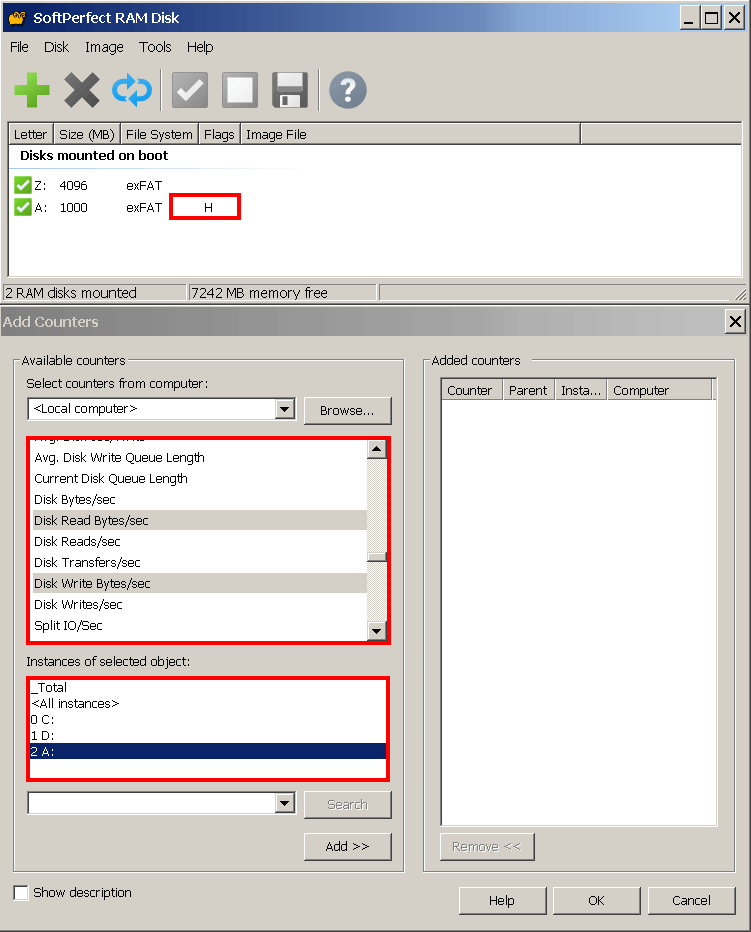
- If you want to monitor the real I/O throughput of your applications with Performance Monitor, you need to enable the Hard Disk Emulation in the RAM Disk's settings. This will slightly reduce the disks' performance, but will make them available under Physical Disks in Performance Monitor, as shown below.
This topic is closed.
It has had no new posts for over a year, so the software versions it talks about may be out of date.
Start a new topic in RAM Disk if you have a similar question.