Moving temp files to RAM disk
10 posts · Closed
How can I move temp files to RAM disk?
When I try moving them in Windows 10 1909, programs and Windows ignore the new variables (simply not create any temp files in RAM disk temp folder).
If I point the variables to physical hard drive, all works perfectly. Why is this happening?
We explained how to redirect temporary folders to a RAM Disk in this article.
If it's not working for you, then perhaps you did something incorrectly. Since you have not provided any details, it's not possible to tell what it might be.
It doesn't work with the latest Windows 10 update. No symlink, and no variable.
I tried it with freshly installed Windows 10 Pro. It doesn't work with any RAMdisk product, not only with yours.
What's your exact Windows version and build number?
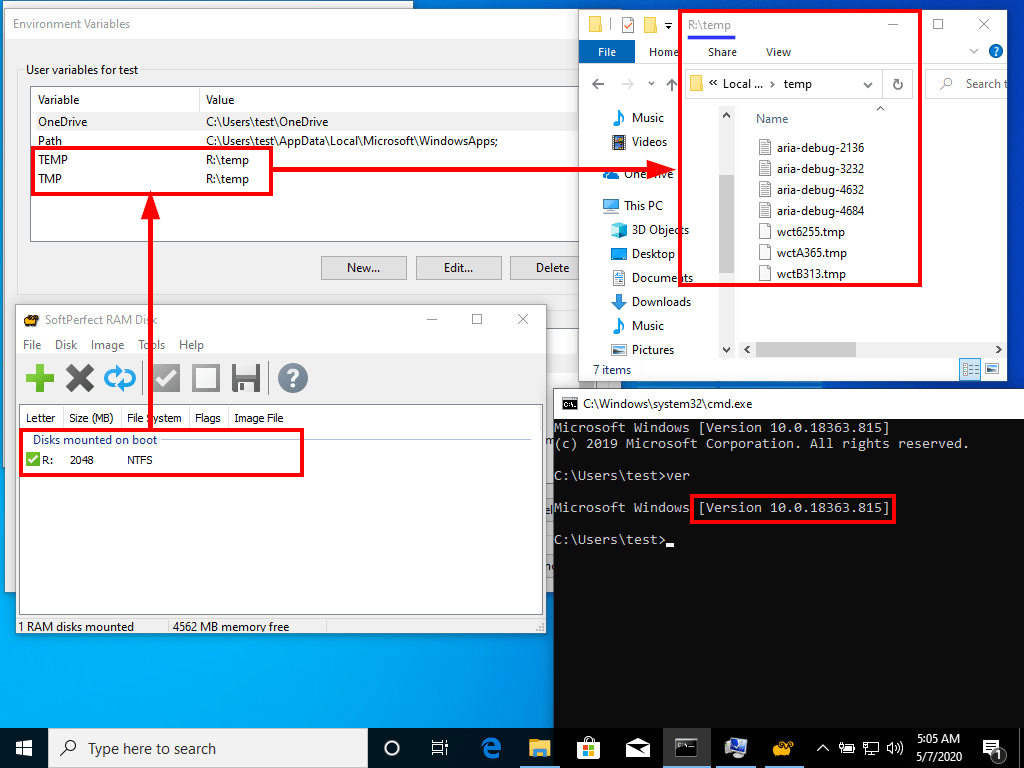
Version 1909, build 18363.815, with latest updates installed.
Tested with variables, and with symlink.
With the real HDD / SDD it works, with ramdisk volume does not.
I have tested this in exactly the same build and it worked as expected:
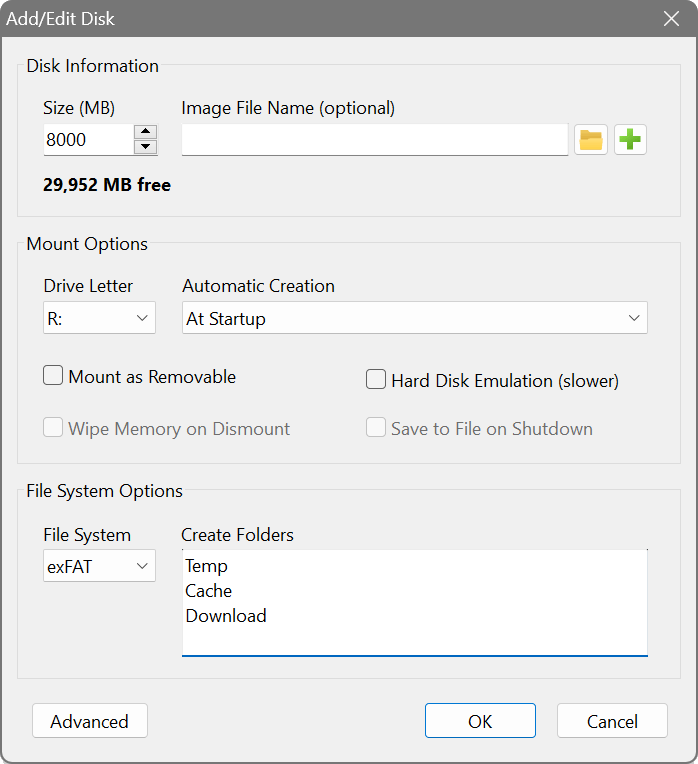
By the way, the temp folder must exist on the RAM disk. Windows will not create it automatically. So, please make sure you have the temp folder added in Create Folders field in the RAM disk's settings. For example:
Test with system temp variable, the one in windir/temp. For example you can try install vmware or other software what uses windir/temp variable.
Most antivirus solutions use it for temporary data and sometimes for high load network or changes in file system that can generate huge amounts of writes. Example: esetnod32 can do over 200gb writes to windir/temp.
I mean local software, not current user.
We don't recommend changing the system variables to a RAM disk.
The system temp variable is used by services and kernel drivers. It's likely to be used before the RAM disk is initialised and ready, and can cause the programs that use it to fail because the temp location would be invalid. They may fall back to using a different location, like %SystemRoot%\Temp, which is probably what you are seeing.
So, only change the user's TEMP and TMP environment variables, to avoid any potential issues.
The problem is need move the system windows/temp folder. My antivirus can create 100+ gb data when in use in multiple 1-20 mb files. Moving system temp is more important to me than user temp.
I am afraid there is nothing RAM Disk can do: it is just how Windows operates and lets other programs to operate. There is no sure way to point the system temp variables to a RAM disk. Depending on your hardware, drivers, OS and other software installed, and how/when they load on boot, moving system temp to a RAM disk may work perfectly well, or may cause errors, even BSOD. We have seen both scenarios on different computers during our tests.
You can try adjusting your antivirus settings, or contact its technical support, or try marking its services as delayed start, or use a different antivirus.