Understanding NUMA Nodes for RAM Disk
7 posts · Closed
I tried to read what was said about NUMA Nodes, but I didn't get it. Does it just mean that the RAM Drive is located all in one area on the RAM drive so it will work faster?
I have 4 memory slots. Does it mean that it chooses just one of the memory slots?
NUMA is only applicable to multiprocessor systems, i.e. those with more than one physical CPU. The NUMA nodes are essentially couples of CPU + memory:
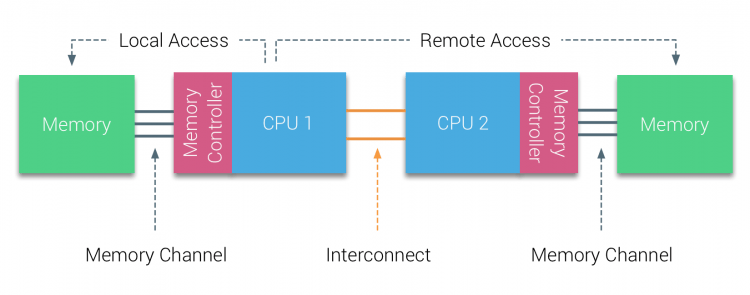
On such systems, allocating the entire RAM disk to a single node improves the performance (interconnect and remote access are more "expensive" in terms of resources).
Most consumer-grade PCs are single-processor, so the selection of NUMA node is not available there.
Andrew,
Thanks for the great answer. So, since I don't multiple CPUs, I should just leave the NUMA node option unchecked, right?
In your case, there will be only one NUMA #0, so checking or unchecking this option will have no effect.
Thanks!
I am reading through all of the forum posts recently to educate myself on all of the nuances regarding RAM disks because I have played with them in the past, had no idea what I was doing, and made a general mess of things on my system. Sorry for ressurecting a 4 year old thread but if the shoe fits, why make a new one?
Regarding NUMA mode, you wrote that it only applies to systems with more than one physical processor. So, just to be clear, this has absolutely nothing to do with multi-core processors that 90% of PC's today have? Just want to be clear about it. If so, it seems like kind of a niche customization to include in with the program, curious why the dev's took the time to do so?
Oh, last thing - being that it is 4 years later from this post and many others that I have read, if you Andrew, still are in charge of this forum, I wanted to include a thank you for all your hard work running this page. This is probably one of the ONLY manufacturers websites/forums that have someone actively monitoring the site and questions do not go months without an answer or the very least some kind of boiler plate response, but more importantly, you are exceptionally educated regarding the ins and outs of this software and provide exceptional responses to nearly every query I have read thus far. And, on top of all that, you are actually polite. Imagine that - if you took over the Logitech forums using the same combination of positive traits that you're using here... Logitech would literally rule the universe. But they don't, because they are absolutely atrocious at how they run their forums. So, TLDR version - Andrew is awesome at his job running this forum, other forums and their moderators could learn so much from how you do the voodoo that you do.
Thanks!
Thank you for the kind words! I'm glad to hear that the forum has been helpful in your journey to understanding RAM disks. Regarding your question about NUMA mode: yes, you're correct. NUMA (Non-Uniform Memory Access) is only relevant to systems with multiple physical processors, where memory is divided between the processors. It doesn't apply to typical multi-core processors found in most PCs today.
As for why it’s included, while NUMA might be niche, it is important for those running high-performance or enterprise systems where optimizing memory access times can significantly impact performance. It’s all about giving advanced users the tools they need to fine-tune their setups.
And thank you again for the appreciation! It's always rewarding to know that the time and effort put into the forum is making a difference. If you have any more questions or need further clarification, feel free to ask!