Parameter to change default cluster size in console
2 posts · Closed
Good day!
Does RAMDisk console have a parameter to change the default cluster size (4k) to a different one when a RAM disk is created?
For example, this command creates a disk with the default cluster size only:
"C:\Program Files\SoftPerfect RAM Disk\ramdiskc.exe" /add:R /fs:NTFS /size:512G /label:TempDB /hdd /type:boot /mount:yes
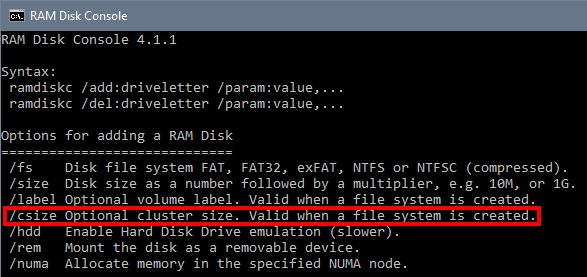
We have added a new parameter csize in the console version ramdiskc.exe, as shown below:
For your information, your command line is incorrect. The /type and /mount are not supported in the console version. In fact, any options listed on the command line switches page only apply to the GUI version (ramdisk.exe, not ramdiskc.exe) and are used for manipulating disks in the GUI.
Any RAM disk created with the console version is automatically mounted, not visible in the GUI, and disappears upon shutdown. To see its complete set of commands, simply launch it in a command prompt without any parameters.